

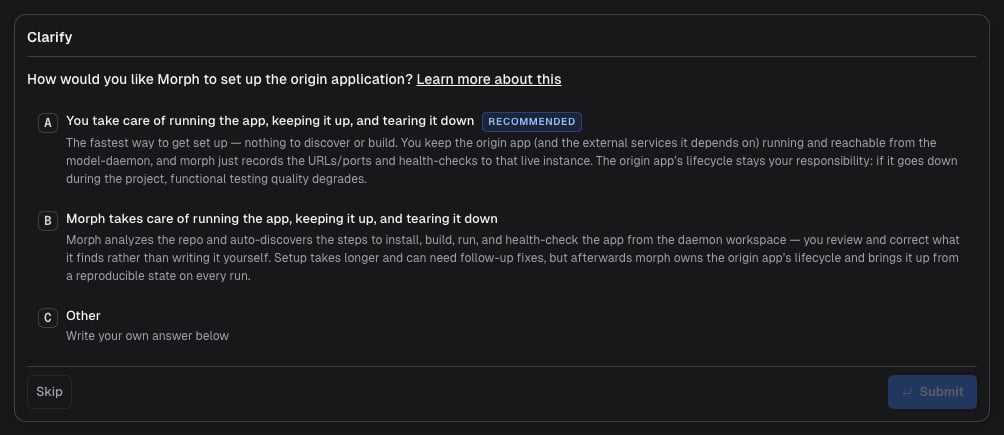
The lifecycle strategy choice only applies to the Self Hosted build environment (where you run ModelDaemon on your own infrastructure). The connect strategy depends on the daemon being able to reach an app you keep running, which is only possible when the daemon lives inside your network.If you’re on Modelcode Hosted, there is no choice to make: the Morph Platform always uses the managed strategy. The hosted sandbox builds and runs the app for you, and it can only reach publicly accessible dependencies and services (public package registries, public APIs). It cannot reach private databases, internal APIs, or private registries — if your app needs those, use Self Hosted.
Why the agent needs runtime access
The Morph Platform modernizes your code. A lot of that work can be done statically — reading the source, reasoning about it, and rewriting it. But code that only looks correct on paper isn’t enough. When the agent can actually run the application and observe its behavior at runtime, the quality of the results goes up substantially: it validates changes against a working app, catches regressions early, and uses functional tests to confirm the modernized code behaves like the original. That runtime access has two requirements:- Access to the origin application - so the agent can observe the original behavior and use it as the baseline it modernizes toward. You grant this with one of the two strategies below (connect or managed).
- Access to external services and dependencies - databases, internal APIs, message queues, private registries, and anything else the app talks to. The target (modernized) application needs these at runtime just as the origin does, so the build environment must be able to reach them.
The two strategies
- Morph runs your app (managed) - The Morph Platform installs, builds, runs, and tears down your application from source, owning its lifecycle on every run.
- You run your app (connect) - You keep the application running, up, and reachable yourself, and the agent connects to that live instance.
Morph runs your app (managed)
With the managed strategy, the Morph Platform takes care of running the app — it owns the full lifecycle: running it, keeping it up, and tearing it down. The agent automatically discovers the install, build, and run scripts by analyzing your codebase, then uses them to start your application from source inside the build environment. The Morph Platform runs the health check and test commands against the app it started. You review the discovered scripts and correct them if needed — you don’t author them from scratch. Setup can take a little longer here, because the agent has to discover and validate how to build and run the app before the project starts. The payoff is that you hand the origin app’s lifecycle to the Morph Platform: it brings the app up from a known, reproducible state on every run and tears it down afterward, so you don’t have to run or keep anything up yourself. Even though the Morph Platform runs the app for you, the external services and dependencies your app relies on — databases, internal APIs, message queues, private registries, and so on — still need to be running and reachable from the build environment. The agent can build and start your app, but it can’t stand up the infrastructure behind it. Choose this when:- The Morph Platform can build and run your app from source.
- You are comfortable setting up the environment yourself.
You run your app (connect)
With the connect strategy, you take care of running the app and the Morph Platform does not build or run it. Instead, you point it at an application that is already running on your infrastructure, and the agent interacts with it directly over its base URL. Install, build, and run steps are skipped; the agent only probes the running instance via a health check. This strategy is only available with the Self Hosted build environment, because the ModelDaemon has to be able to reach the running app from inside your network. Setup is much faster because there’s nothing to discover, build, or validate up front — you just provide the URL. The trade-off is that the origin app’s lifecycle stays your responsibility: the Morph Platform only probes the instance you point it at, so running it, keeping it up and healthy, and tearing it down for the duration of the project is on you. You provide:- Base URL - The root URL where your application is accessible (for example,
http://localhost:8000). - Health Check Command - A command that confirms the app is reachable and healthy (for example,
curl -f http://localhost:8000/health). - External services and dependencies - The databases, internal APIs, message queues, private registries, and any other services your app talks to must be running and reachable from the build environment. The target (modernized) application needs them at runtime just as the origin does.
- Your application is already deployed and running, and you want the agent to work against that instance.
- You want to get started quickly and are comfortable keeping the origin app running yourself.
- Building or running the app from source inside the build environment is impractical (for example, it depends on infrastructure the build environment cannot reproduce).
A note on shell syntax
Whichever strategy you pick, the commands you supply run in the shell for your project’s platform — bash on Linux, PowerShell on Windows. The platform is chosen once during Build Environment setup and does not change, so commands written for one are never re-interpreted for the other.Which should I pick?
Pick based on the trade-off above: connect gets you started fastest if you already keep the app running, while managed hands the origin app’s lifecycle to the Morph Platform once it’s set up.
Related Docs
Lifecycle Setup
Configure the scripts, environment variables, and health checks the agent uses
Modelcode Hosted
Let Modelcode provision a secure sandbox to build and test your app
Self Hosted
Run ModelDaemon on your own infrastructure for projects with private dependencies
Core Concepts
Build environment terminology and mental model