

October 2026
Move a hosted project to self hosted
A project that started on Modelcode Hosted can now move to a self-hosted ModelDaemon mid-project, so your migration runs on your own infrastructure with access to your real staging and dev services. Open Build Environment from the Roadmap and click Move to self-hosted. Merge all open milestone PRs first. Open chats are closed, and the project returns to onboarding until the new environment is validated. The move is one-way. See Switching Environments.September 2026
This month puts you more firmly in control of each milestone — you approve what it costs before it runs, you can keep refining a project spec after you’ve approved it, and code review gains tagging, effort estimates, and on-demand frontend tests.Approve a milestone’s cost before it runs
Starting a milestone now opens a short confirmation that shows the estimated credits and, when the work would go beyond your monthly allotment, the exact dollar amount. Milestones that fit within your included credits start for free; anything that would incur overage runs only after you approve the charge — nothing bills silently. Credits are deducted when the milestone’s pull request is created. This applies to plans on the credit-based billing model; some organizations, such as self-managed deployments, don’t see the confirmation step. See Billing and Credits for the full model.Edit approved project specs
Approving a Project Spec no longer locks it. You can keep refining an approved spec with Knowledge chat — adjust its prose or repository topology — the same way you did before approval. If milestone planning has already run, your edits apply to future milestones only; the source repositories chosen at project creation stay fixed. See Project Spec.Code review: tags, effort estimates, and frontend tests
The Code Review drawer gained three things:- Issue tags. Create and assign tags to review issues from the issue card, then filter and group the list by them.
- Effort estimates. Issues the review agent has sized show a T-shirt-size badge (XS–XL), so you can triage by how much work each one is.
- Run the frontend tests from chat. On projects with a frontend, ask the chat to run or re-run the milestone’s Playwright suite — for example after it fixes a UI bug. Results and screenshots refresh in the drawer’s Validation tab when the run finishes.
Run a single milestone at Low validation
When one milestone is expensive to validate — a slow or unreliable app runtime — you can run that milestone only at the Low level without changing the project setting. Open the caret beside Approve & Start in Project Knowledge and choose Start With Low Validation. Run an ad-hoc validation after the PR merges to cover the project’s real level. See Running a Single Milestone at Low.August 2026
This month makes build capacity a team resource rather than a per-machine one, and deepens what gets checked after every milestone.Review and validation, in one place
Code Review is no longer only about issues. The milestone’s test results now live alongside them, under a Validation tab split into API/CLI, UI Tests, QA Agent, and Lifecycle. Every result has a Discuss button that drops it straight into the review chat. Instead of describing a failure to the agent, you hand it the failure. Failures that opened a review issue now link both ways, so you can get from a red test to the issue tracking it, and back.A QA agent that actually explores your application
Frontend validation used to be one agent writing and running browser tests. It is now two, with different jobs. A QA agent explores your migrated application the way a person would, capturing what it finds side by side against the original. A separate test agent then writes and runs the automated suite from that report. The practical difference is coverage you did not have to specify. The QA agent finds the screens and flows that matter by looking, rather than only testing what someone thought to describe — and its paired before-and-after evidence is often the most convincing artifact in a migration review.Knowledge that finds itself
Once your Project Spec is approved, Morph reads it and searches your organization’s knowledge for anything worth reusing on this project — based on what the migration intends to do, not only on which repositories happen to match. The result arrives as a selection during onboarding, with the best matches marked Recommended. You choose what to bring in. This is where the second migration starts costing less than the first. Lifecycle knowledge, conventions, and hard-won corrections from earlier projects show up at the beginning instead of being rediscovered. Relatedly: knowledge import is no longer restricted to projects that share repositories with yours. The whole organizational pool is available, with relevance driving what gets recommended rather than what gets shown. Hover a Recommended tag to see why an item was suggested.Every milestone re-checks the ones before it
From the second milestone onward, the functional tests accumulated from all previous milestones run as a regression suite after the current milestone’s own tests. This is what keeps a long migration honest. Work landing in milestone 8 cannot quietly break behavior that was proven in milestone 2 without you hearing about it. A regression failure is surfaced rather than blocking, because the right fix may belong to either milestone — that is a judgement call, not something to automate.See a finished migration before connecting anything
There is now a read-only sample project: a real modernization, replayed end to end across twelve steps, reachable from the sign-in screen without connecting a repository. Chat replays the actual conversation recorded during that migration, so you can see how the agent was directed rather than just the outcome. Nothing writes to any account. It is the fastest way to judge fit — and the easiest thing to send to a colleague who wants to understand the product without starting a trial.Set up a project together
Project setup is now a shared activity rather than a solo one. Setup is held by one person at a time, and that person can hand over to a teammate — with the new owner notified by email. This matters because onboarding often needs two kinds of knowledge that rarely sit with the same person: what the application does, and how it builds. Now the person who knows the build can take the build environment step and hand it back.Smaller things worth knowing
- Validation that means something. A
smokescript is now part of validating your original application. A health check proves a process is listening; a smoke test proves the application works. Until one passes, a lifecycle is not treated as validated. - Database seeding is its own step. A new
seed_dbscript separates preparing data from starting the application, so Morph can restart your app without re-seeding it each time. - Closing a pull request finishes the milestone. Closing a milestone’s PR without merging now completes it. To get different code, use review chat or an ad hoc milestone rather than closing and hoping for a retry.
- Copyable invite links. Creating a user or invitation now gives you a link you can send directly.
- Seat visibility. The Members screen shows how many seats are in use, and tells you what to do when they are all taken instead of failing at the last step.
- The Validation Hub works at every level, including Low. There are no functional tests to show there, but your lifecycle results still tell you whether the application installs and builds.
ModelDaemon pools
Self-hosted daemons are now organized into pools: shared groups of machines that serve one or more projects. A team’s build capacity belongs to the team, so nobody waits on one specific person’s machine. Previously, each team member ran their own daemon and their own work was routed to it. That meant setting up a daemon before you could do anything on a self-hosted project, and your work stopped whenever your machine did. Any member of your organization with access to a project can now run work on that project’s pool, so most people never need to install anything. One person sets up the pool, and the whole team uses it. If you already have self-hosted daemons, this migration has been done for you. Existing daemons were converted into pools automatically, with no change to how your projects behave — nothing to install, migrate, or reconfigure.Add a machine, get more capacity
A pool can hold as many daemons as you want. Morph routes each piece of work to an available machine on its own, so you never assign jobs or think about which daemon runs what.- Adding a daemon to a pool increases capacity for every project connected to it — you are not sizing capacity per project.
- One pool can serve several projects at once, so a single set of machines can back your whole modernization program.
- Each pool declares its operating system and architecture up front, so work only ever lands on a machine that can run it.
Join a pool instead of building one
When you set up a self-hosted build environment, you now choose between joining an existing pool and creating a new one. The pool list shows each pool’s scope, status, connected projects, and daemon count, so it’s clear which one is the right home for your project.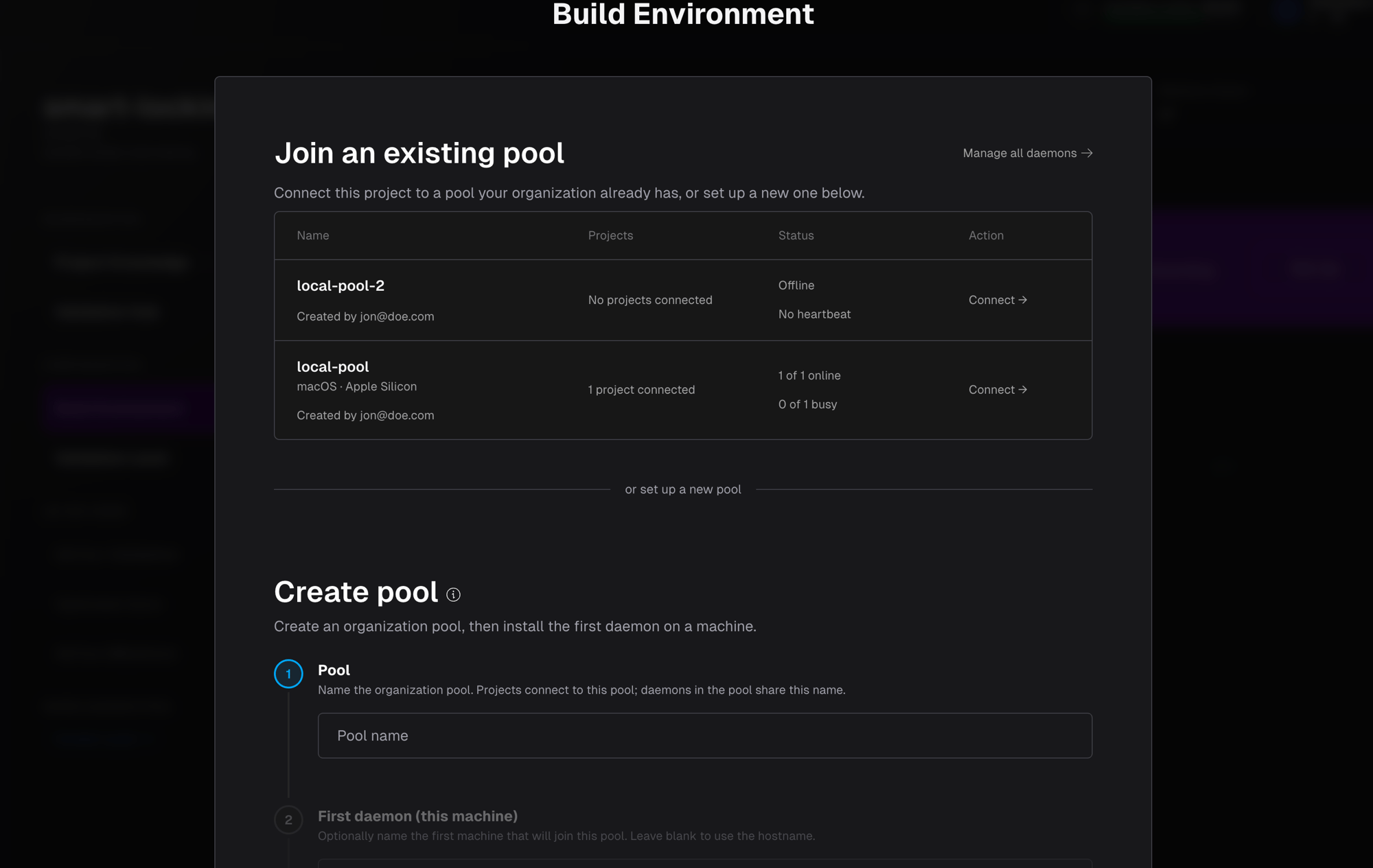
See what your pool is doing
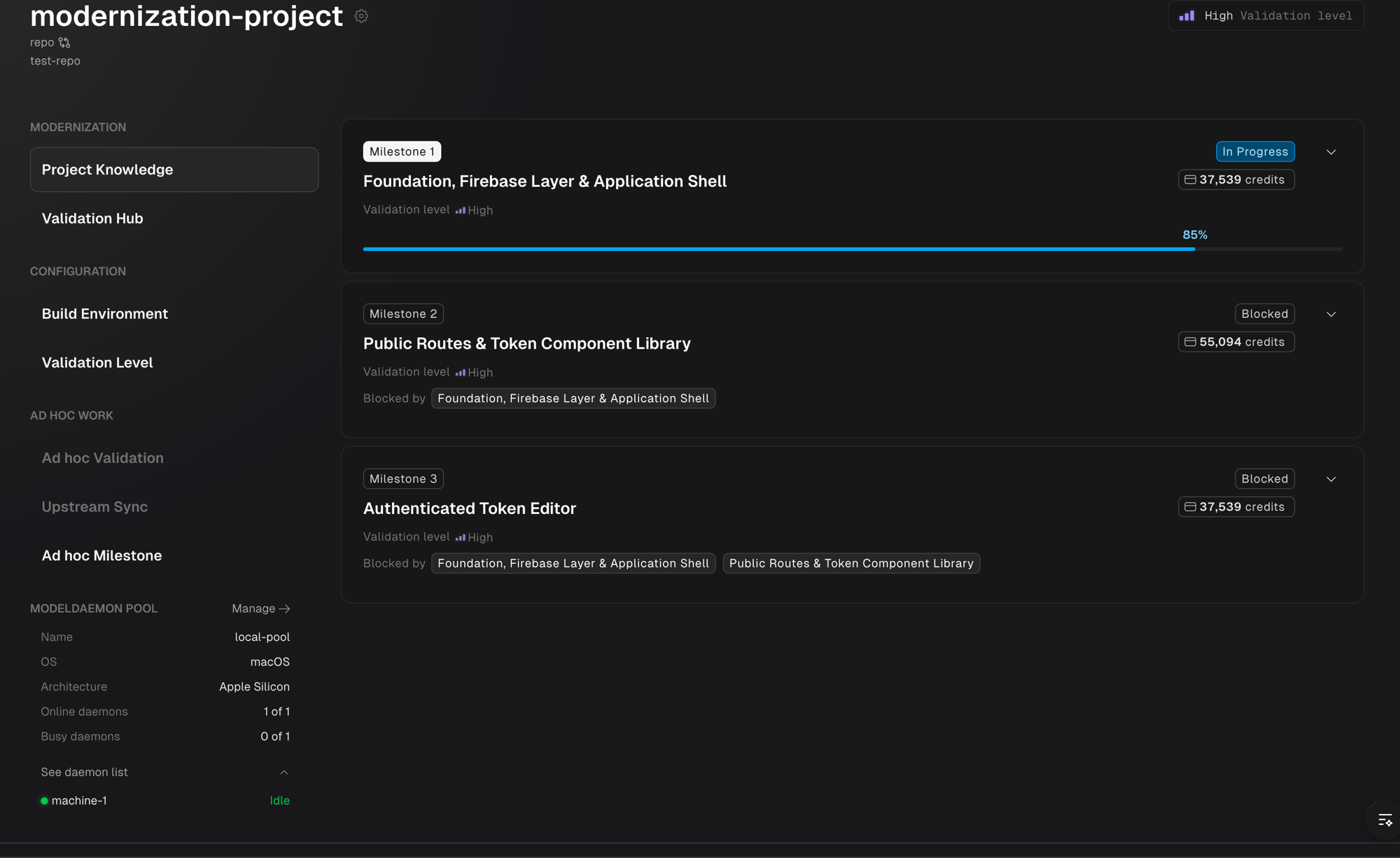
Your project’s Roadmap sidebar now has a Daemon pool section showing how many machines are online, what is currently running on them, and a link to manage the pool.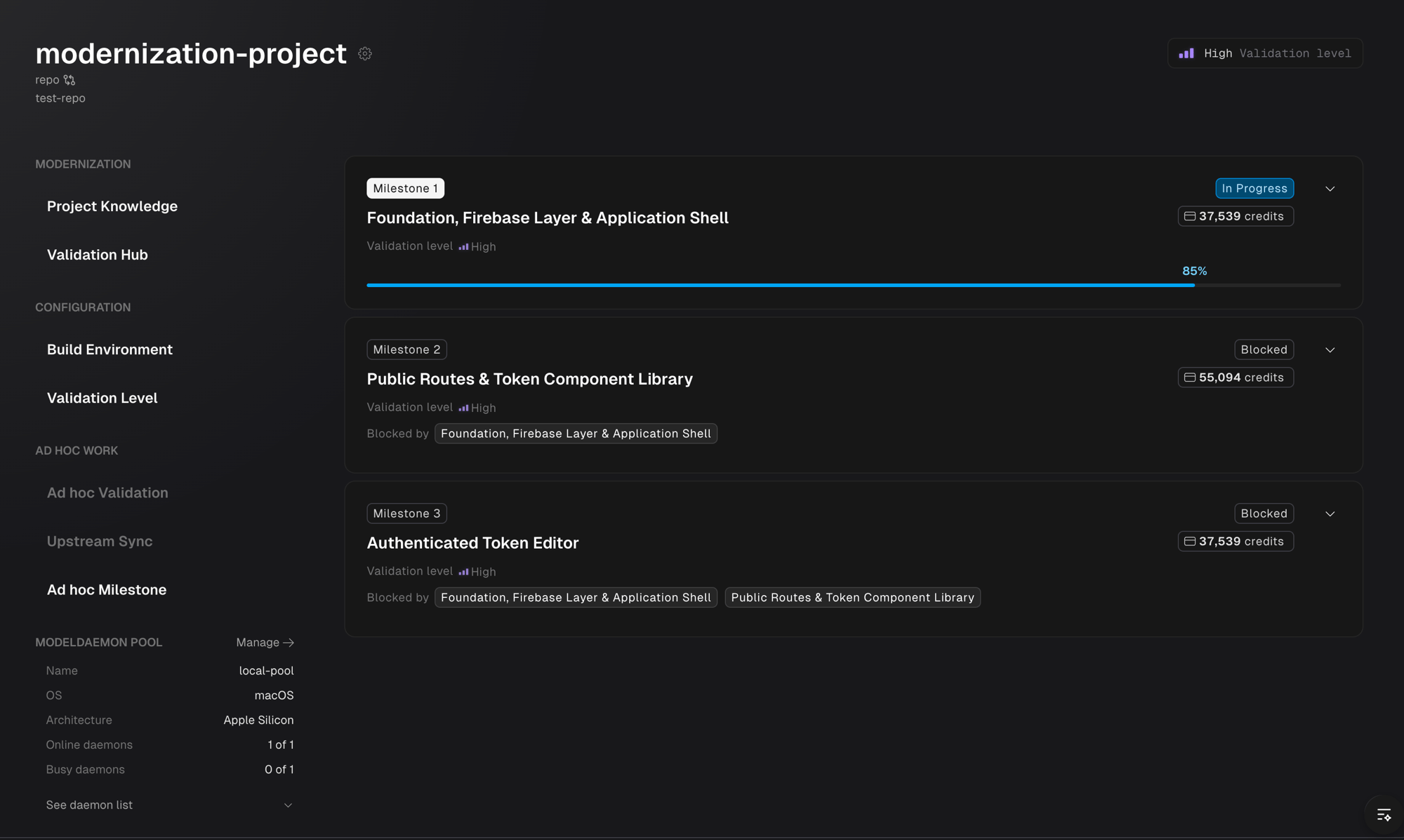
Idle or Busy.
Chat is never blocked by a busy pool
Knowledge chat and Code Review chat are exempt from pool capacity limits. Even when every machine is running a milestone, you can still open project knowledge or review code — the work that needs your attention is never gated behind the work that doesn’t.Organizational Knowledge: automatic tagging and item-level import
Project artifacts — lifecycle scripts, dependencies, acceptance criteria, instructions, project configuration, and wikis — are now automatically tagged with their associated repositories as projects are set up. That makes them discoverable as organizational knowledge with no manual export step. The Organizational Knowledge page gives you a centralized view of all knowledge across your organization, with filtering by repository and source project.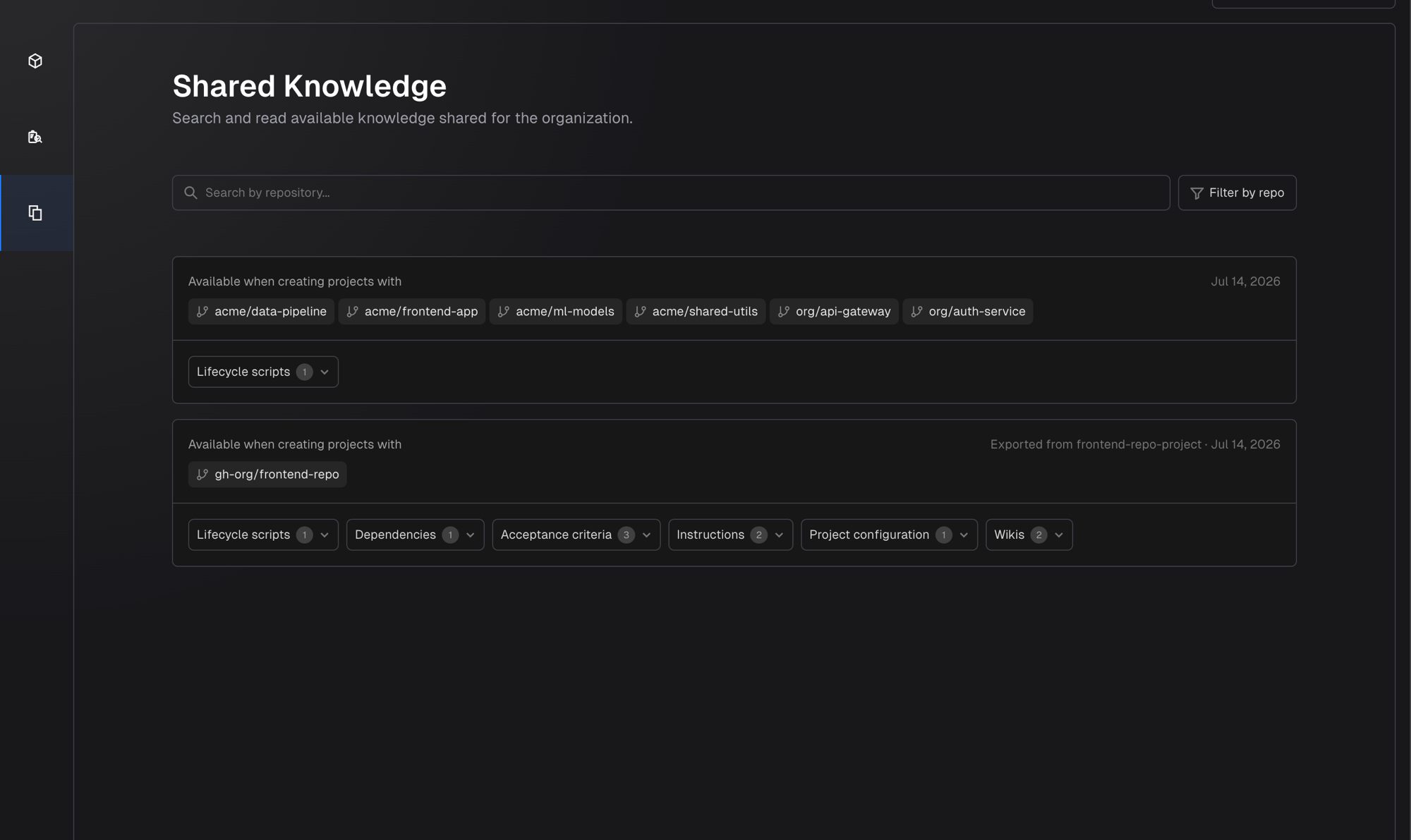
Import specific items, not everything
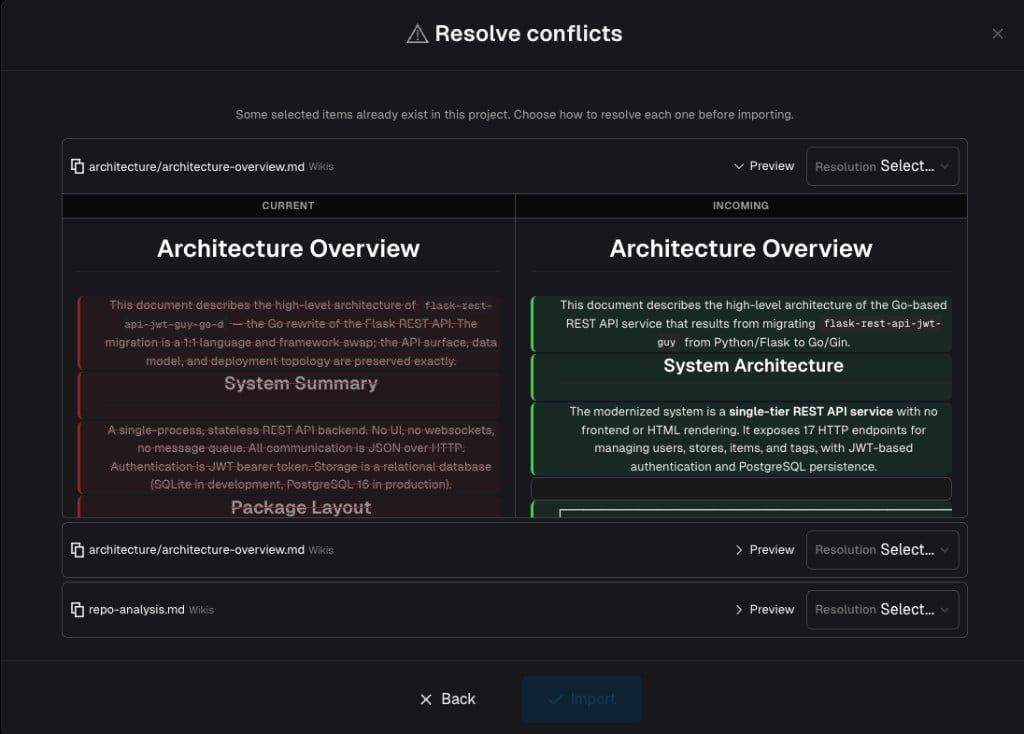
When creating a new project — or at any time afterward from the Roadmap sidebar — you can selectively import specific items from the organizational knowledge pool instead of importing all of it. In the create project form, click Manage in the Organizational Knowledge section to open the knowledge transfer drawer, where you can browse, search, and filter available items by artifact type. At project creation the drawer offers instructions and wikis from across your organization, with the most relevant marked Recommended. Nothing is selected for you — you choose what to bring in.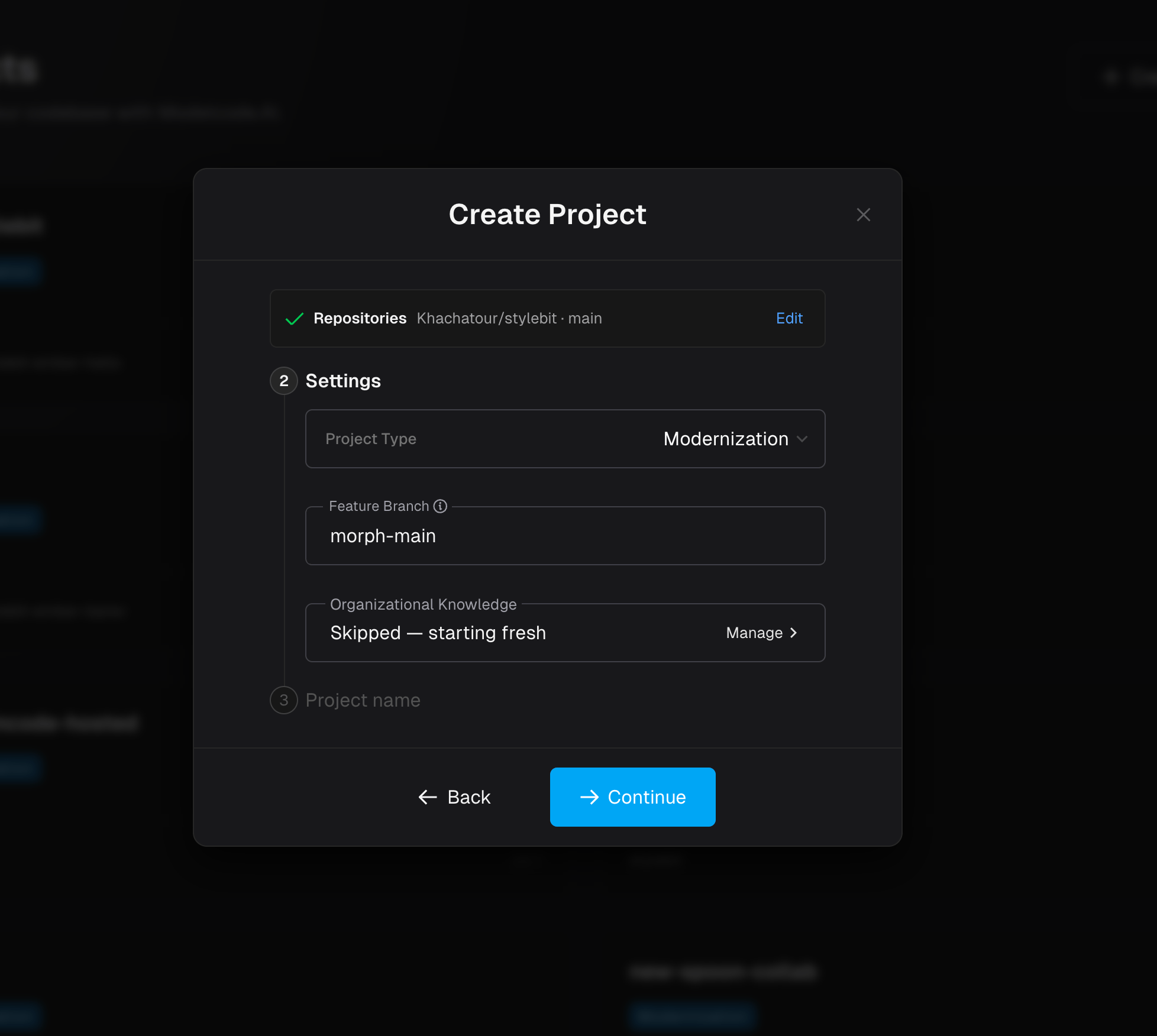
July 2026
This month introduces parallel milestone execution, collaborative review, per-user daemon routing, and upstream sync — making large migrations faster to deliver and easier to coordinate across teams.Parallel milestones
Milestones now declare dependencies on one another. When milestones are independent (no shared file dependencies), they can execute simultaneously — each on its own branch, each producing its own PR. Dependent milestones remain locked until their prerequisites merge. This means faster delivery without sacrificing PR review boundaries. You still review and merge each milestone individually; the difference is that independent work no longer waits in a queue. When a milestone merges while sibling branches are in progress, Morph detects whether those branches need to incorporate the new code and flags them as Rebase Required. Triggering the rebase is a single click — the agent handles the integration automatically.Collaborative review
Multiple team members can now review the same milestone at the same time. Each reviewer gets their own independent review chat session — conversations, issue triaging, and resolutions don’t collide. When one reviewer resolves an issue or the agent applies a fix, Morph propagates the workspace changes to other active reviewers so everyone sees the latest code state. Chat sessions are locked to one active user at a time to prevent conflicting agent instructions, but multiple reviewers can browse issues and code in parallel.Per-user ModelDaemon
For self-hosted daemon deployments, the routing model is now one daemon per user instead of one daemon per project. Each team member’s daemon handles that user’s work and runs one active job at a time — so multiple team members can work on the same project simultaneously without blocking each other. The daemon reports its status in real time: online, busy, or offline. If your daemon is busy, new requests queue until the current job finishes.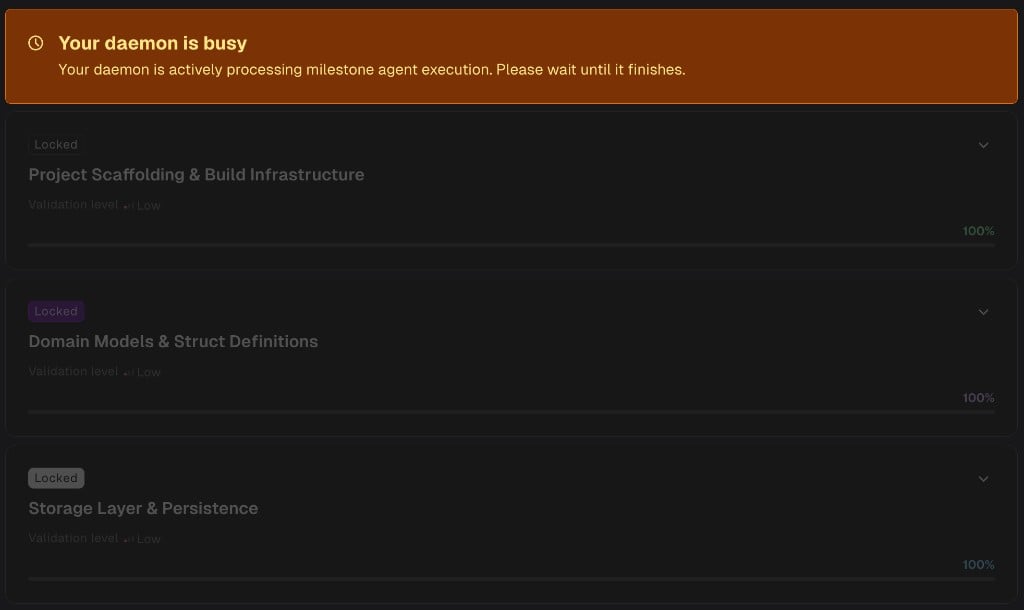
Upstream sync
Upstream sync is now fully available. When your team pushes changes to the repository’s mainline during the migration, you can trigger an upstream sync to incorporate those changes. This creates a sync milestone, updates the project baseline, and rebases any in-progress milestone branches — all handled by the agent.June 2026
This month, we focused on making Morph more practical for real modernization work: stronger quality gates, more flexible project setup, smarter functional testing, better notifications, and expanded deployment options for restricted environments.Acceptance Criteria
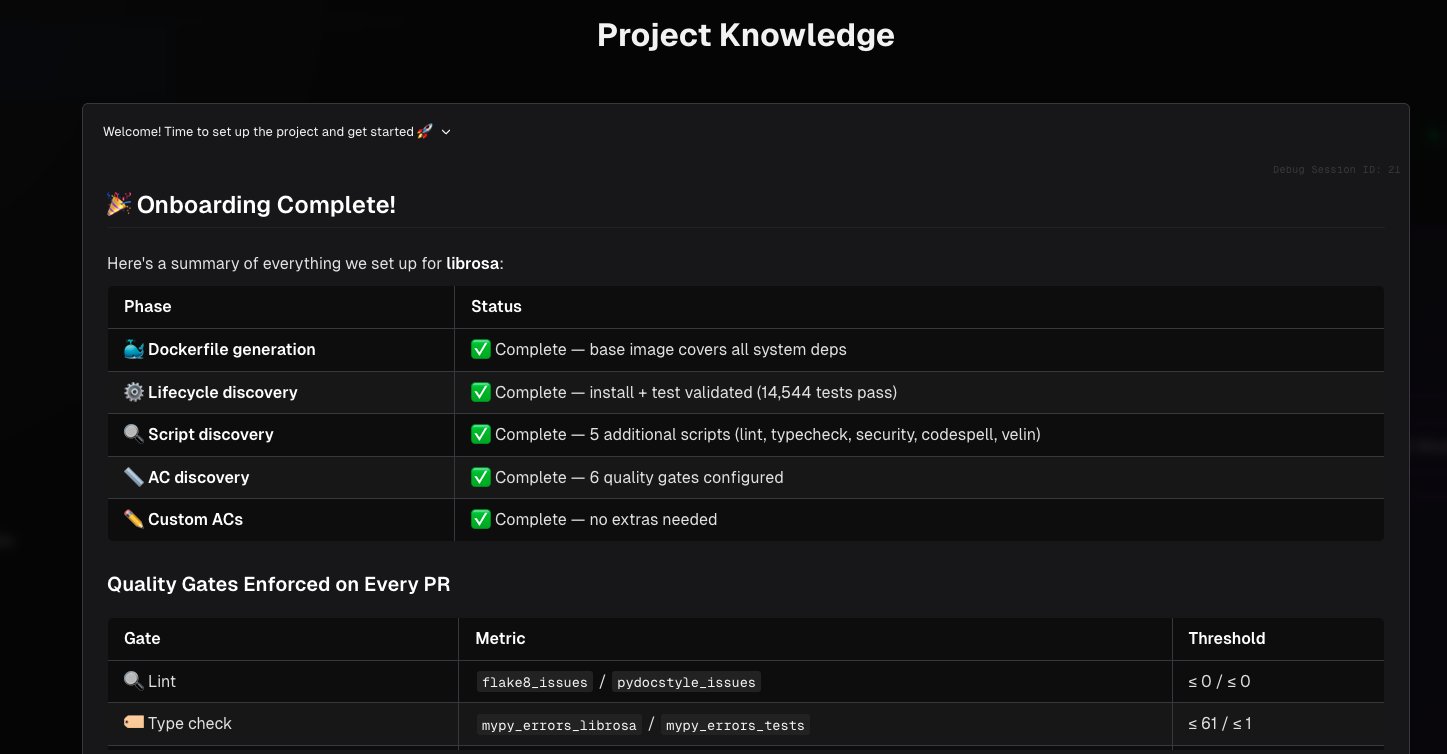
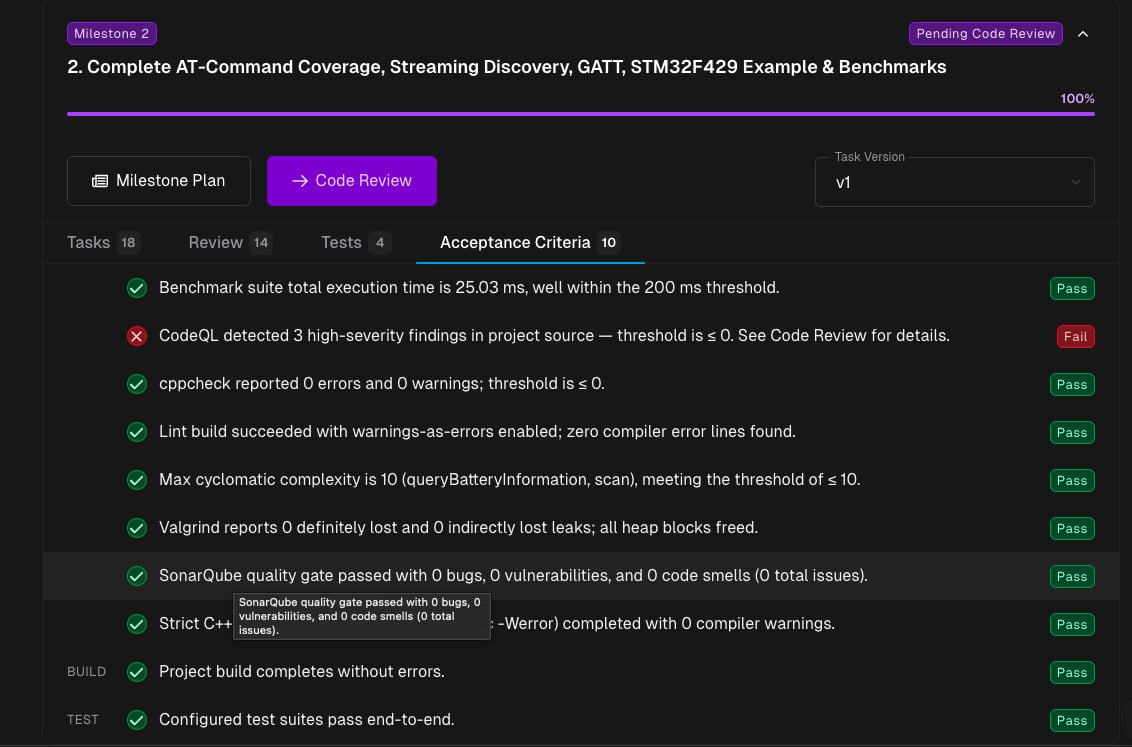
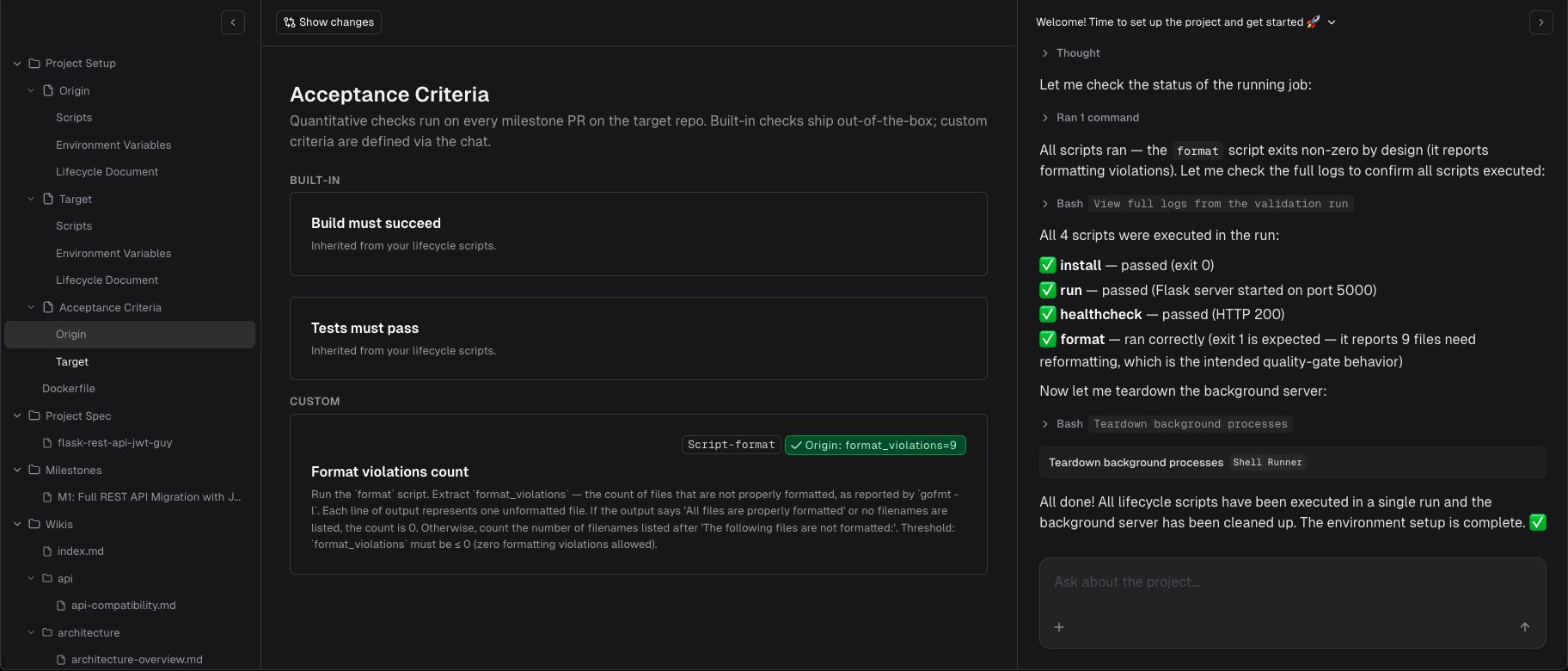
Acceptance Criteria bring measurable, automated quality gates to your code modernization projects. Instead of relying solely on builds and tests passing, you can now define custom checks - like performance thresholds, code coverage targets, benchmark results, or any quantifiable standard - that are automatically enforced before code is merged. Each Acceptance Criteria check is linked to your project’s lifecycle scripts and captures a baseline from the original codebase. As modernization progresses, every milestone review automatically validates that the modernized code meets the same, or better, quality bar as the original. If a check does not pass, the pull request is flagged before merge. To help you get started quickly, Morph can automatically discover relevant lifecycle scripts and suggested Acceptance Criteria based on your codebase’s structure and testing patterns. You can also create and manage Acceptance Criteria manually through chat.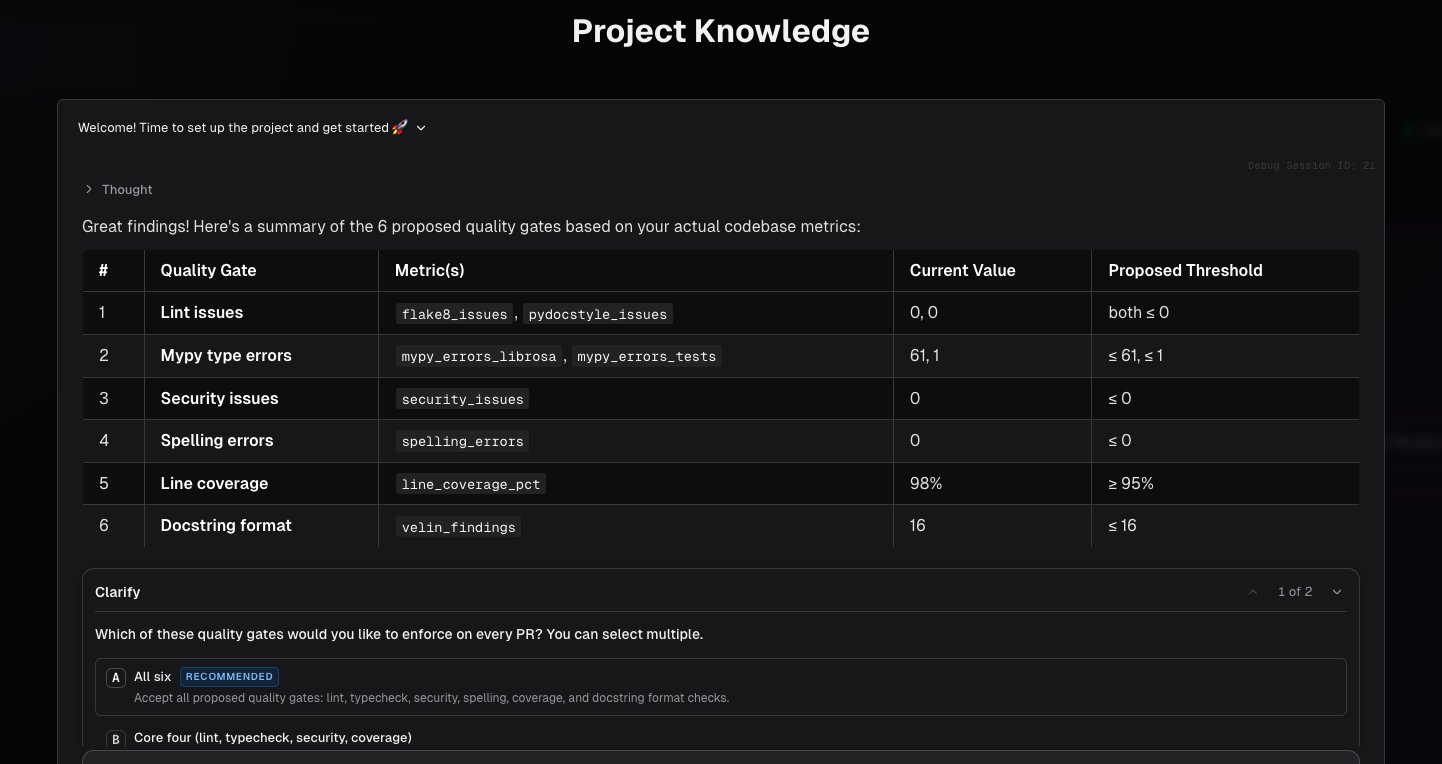
Multiple projects per repository
You can now create multiple Morph projects from the same source repository. If you want separate modernization tracks, a maintenance project alongside an active migration, or different scopes on the same codebase. Each project still runs on its own feature branches and milestones, so work stays isolated even when the underlying repository is shared. When you create a project, the repo picker shows which other projects already use that repository, so you can make an informed choice. Morph handles setup efficiently behind the scenes, and removing one project will not disrupt another that shares the same source - your other projects, branches, and in-progress work stay intact.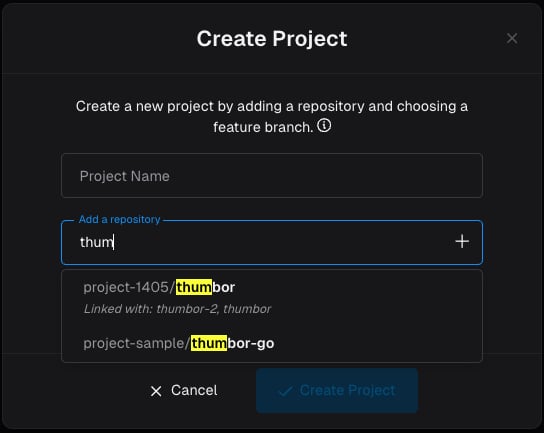
Functional testing improvements
Morph’s functional testing workflows are now smarter across backend tests, frontend E2E tests, and projects where the application is already running.Smarter backend functional tests
The backend testing agent now classifies features per endpoint rather than per repository when deciding what has pre-existing behavior to compare against. It also sets up reproducible test environments by seeding databases and running lifecycle scripts.Frontend E2E test generation improvements
The frontend testing agent now detects and reuses existing Playwright suites in the target repository instead of scaffolding from scratch. It reuses the repository’s existing authentication setup, defaults to mocked APIs for stability, and captures results even when tests fail.Connect to a running application
Morph can now connect to an already-running application instead of managing the application lifecycle itself. The testing agent understands connect mode: it verifies connectivity without attempting to restart the app.Notifications
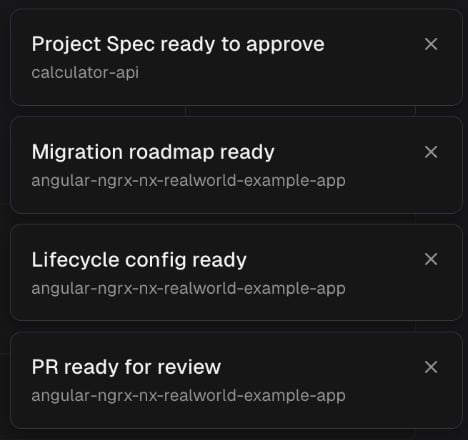
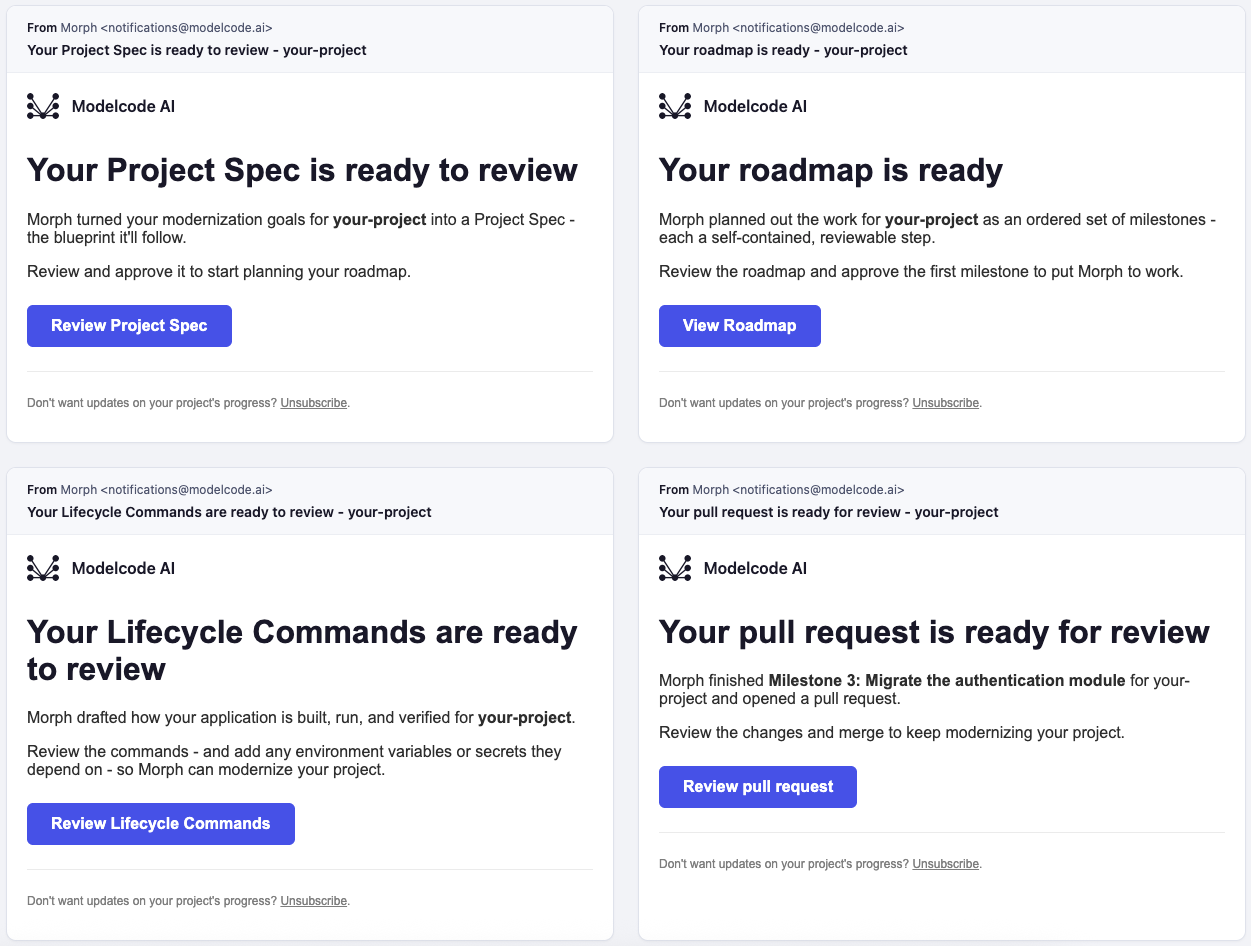
Morph now tells you when something is ready to review or input is needed. Five moments produce a notification:- Your Project Spec is ready.
- Your Roadmap is generated.
- Your Lifecycle config is drafted.
- A milestone pull request is pending review.
- Morph is waiting for input
On-prem and air-gapped Morph platform support
Modelcode now supports on-premise and air-gapped deployment of the Morph platform in Amazon Web Services, AWS GovCloud (US), and Google Cloud Platform. This gives customers more control over their environment by enabling independent deployments through Terraform scripts and deployment documentation. By removing dependencies on external cloud-hosted services like GitHub, Morph can support modernization workflows that need to run securely within isolated infrastructure. The platform uses Kubernetes for orchestration and Gitea as a self-hosted Git provider to manage code repositories locally. This architecture supports critical operations such as pull requests, comments, and milestone agent executions entirely within the customer’s network. It also handles the orchestration needed to seed initial tenants, provision administrative users, and automate Docker image bundling to streamline installation in restricted environments.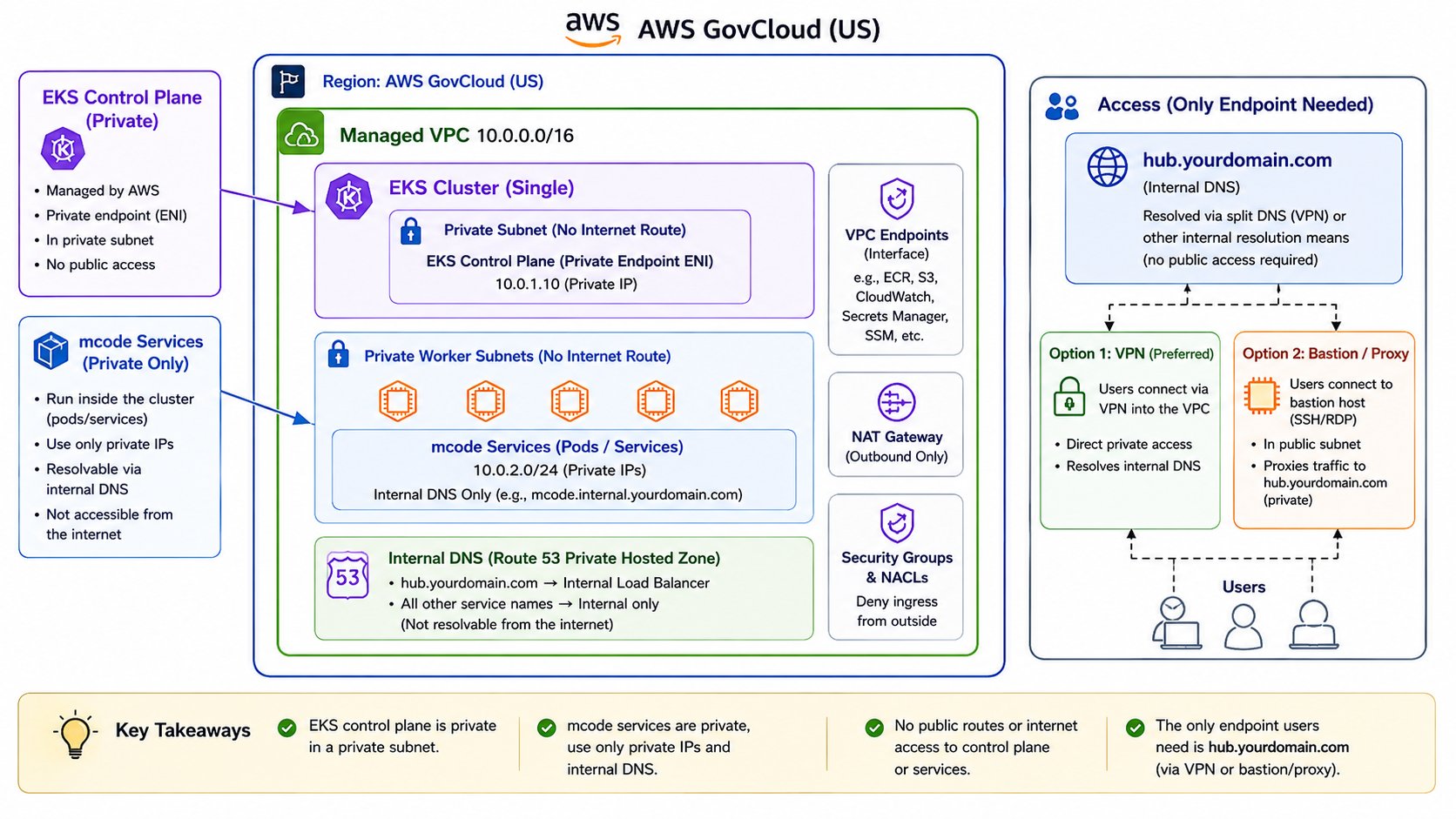
Gitea as an external provider
We’ve now added Gitea as a core Git provider, it adds support for customers who cannot use cloud-hosted platforms like GitHub because of network restrictions, compliance requirements, or air-gapped environments. For these customers, Morph provides its own Gitea instance as the code-hosting layer, giving teams a fully functional Git workflow without requiring external connectivity.May 2026
Multi-repo support is generally available
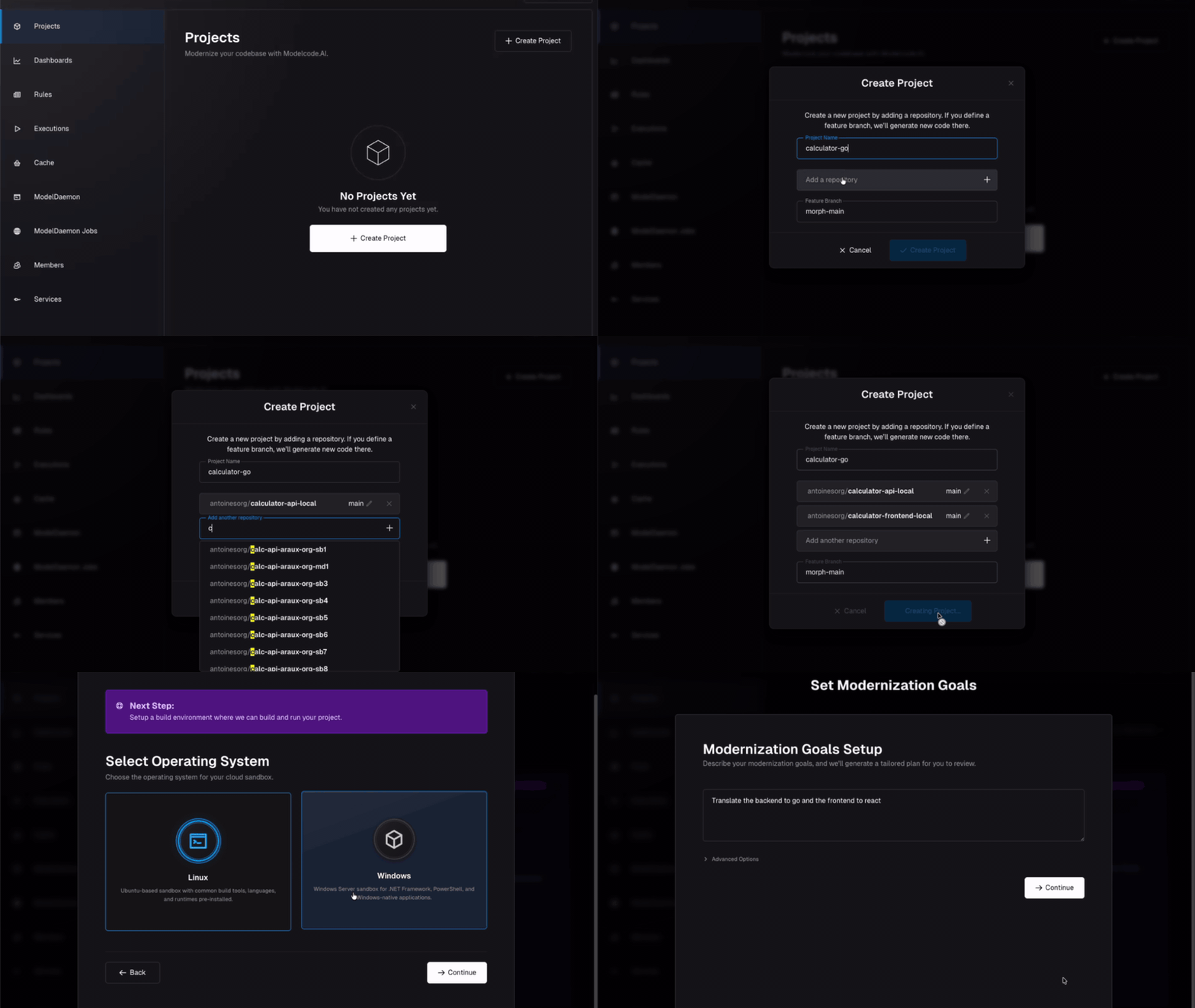
The Morph Platform now supports many-to-many modernization projects across multiple source repositories and multiple target repositories. This is especially important for enterprise backend modernization projects where the application is spread across services, shared libraries, APIs, generated clients, and separate target applications. What changed- The Morph Platform can support many source repos to many target repos.
- Modernization projects can include multiple related codebases.
- Backend modernization workflows can better reflect real enterprise application structures.
ModelDaemon
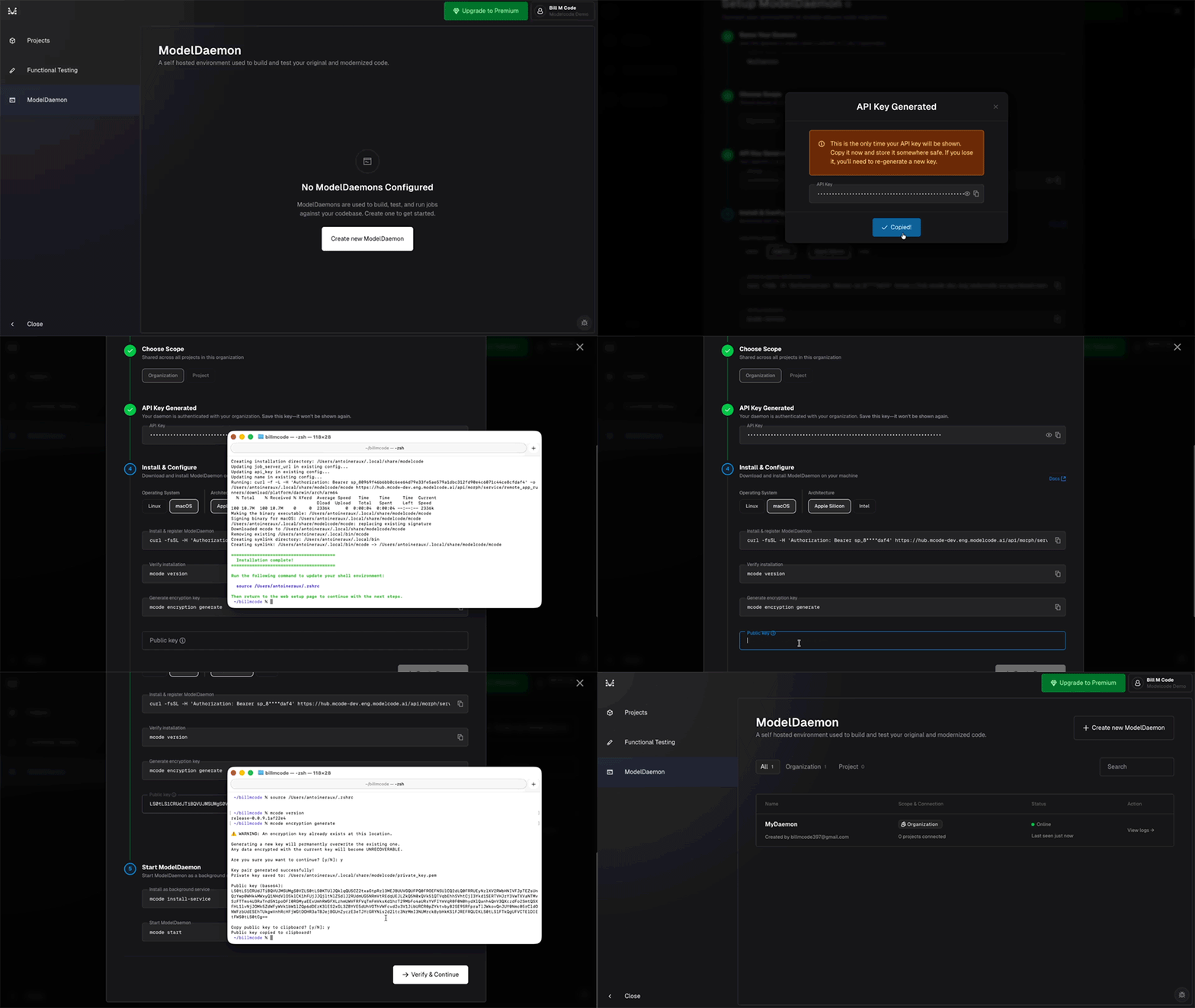
ModelDaemon introduces a more secure and scalable execution model for customer environments. MD runs inside the customer’s infrastructure using outbound-only connectivity. the Morph Platform continues to orchestrate the work, while execution happens closer to the customer’s code, dependencies, tools, and internal systems. What changed- ModelDaemon runs inside the customer environment.
- Connectivity is outbound-only.
- The Morph Platform can execute work closer to private code, private dependencies, and internal infrastructure.
- The daemon now supports smarter execution through the
morph-agentat the edge.
Smarter local execution with morph-agent
With ModelDaemon, the daemon is no longer just a remote command runner. Themorph-agent can run full LLM-driven and it allows the agent to reason through dependencies, make code changes, run commands, execute tests, and handle workflows directly inside the customer’s infrastructure.
What changed
- The daemon can run LLM-driven execution loops locally.
- Code changes, dependency handling, and workflow execution can happen inside the customer environment.
- The Morph Platform orchestration coordinates the work while the daemon performs richer local execution.
Distributed and scalable execution architecture
ModelDaemon also moves the Morph Platform toward a more distributed, async, event-driven execution architecture. This replaces the older tightly coupled Docker-control model with a more flexible execution system based on parallel workspaces and event-driven coordination. What changed- Execution is now more async and event-driven.
- Parallel workspaces improve flexibility and scalability.
- The Morph Platform is less dependent on tightly coupled Docker control paths.
Improved ModelDaemon setup experience
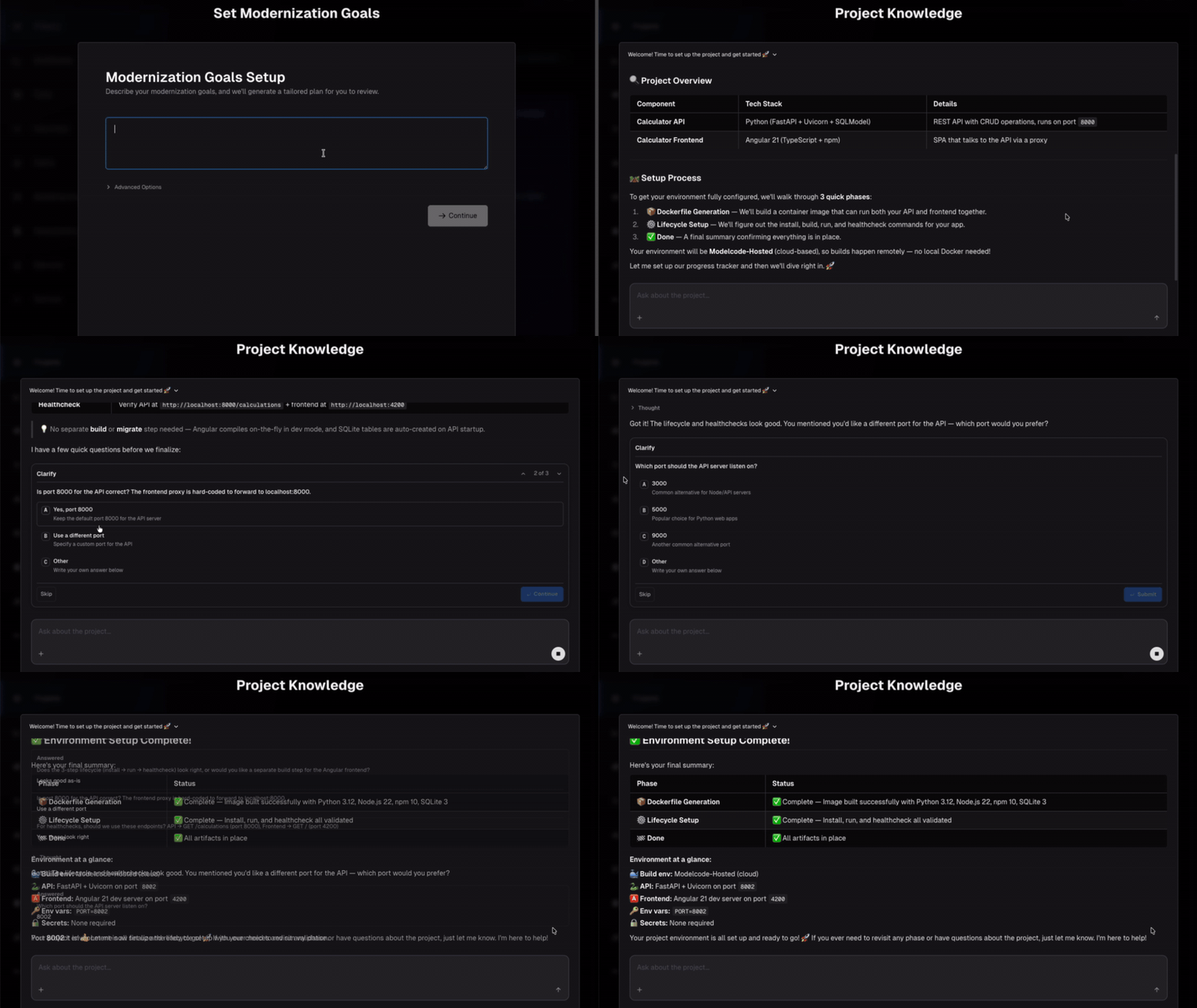
The Morph Platform now provides a more continuous setup and execution flow for ModelDaemon projects. Instead of requiring users to complete a rigid multi-step configuration process, the Morph Platform can analyze the repository, detect dependencies, identify missing metadata, and provide clearer next-step guidance during execution. What changed- Repo analysis is more integrated into setup.
- Dependency detection is clearer.
- Missing metadata is surfaced earlier.
- Execution progress is streamed with better guidance.
Robust functional testing
The Morph Platform can validate parts of your application, such as APIs and services, and continue making progress even when some dependencies are missing. What changed- Missing dependencies no longer have to block all progress.
- The Morph Platform can continue useful work even when the full environment is incomplete.
Clearer errors and chat driven resolution
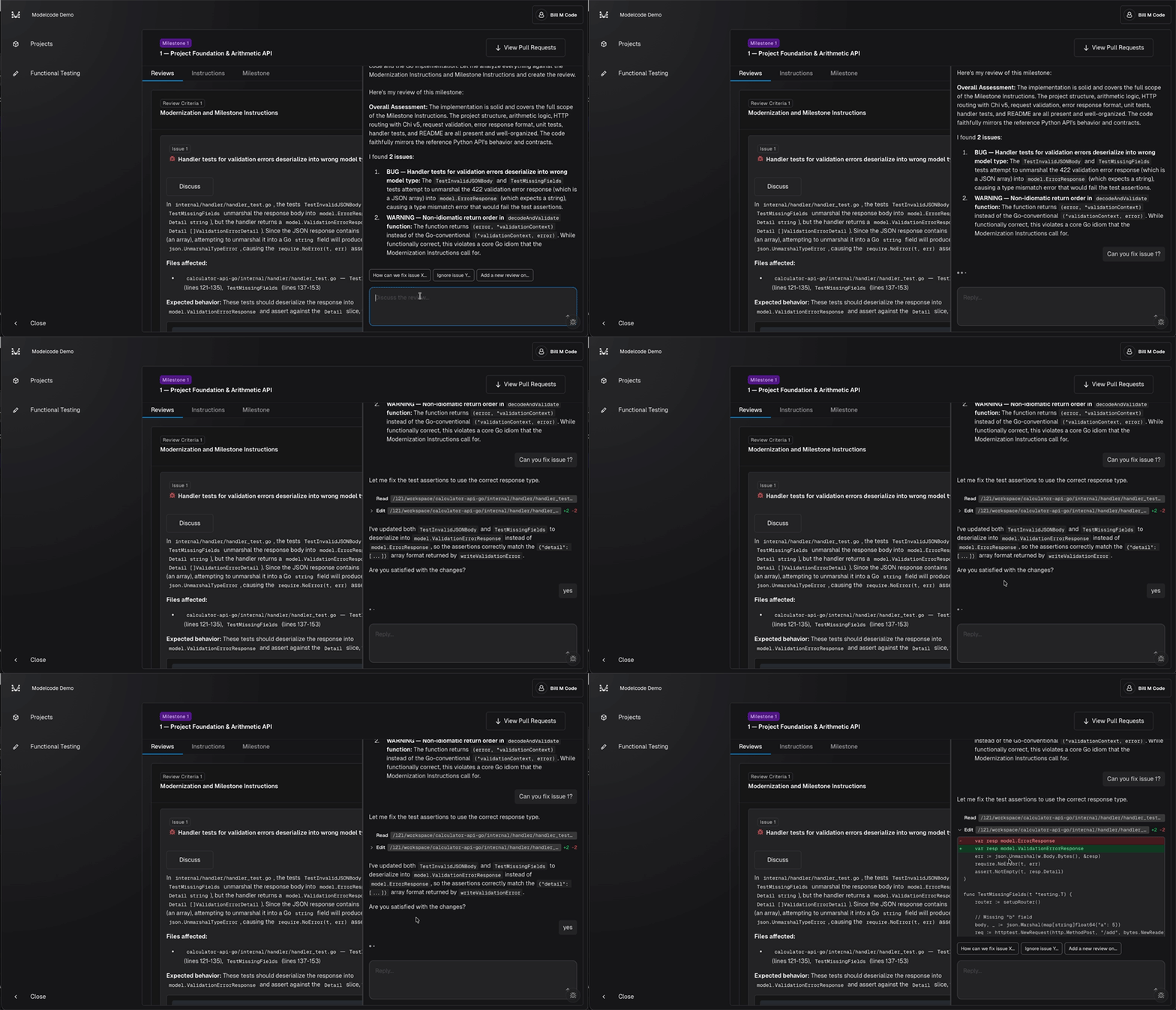
The Morph Platform now provides clearer explanations for configuration and lifecycle command errors. For common setup issues, the Morph Platform can suggest a fix, apply it, and retry execution through chat. What changed- Configuration errors are easier to understand.
- Lifecycle command failures include clearer explanations.
- Common issues can be resolved with the Morph agent
- The Morph Platform will automatically retry execution after applying a fix.
Frontend modernization support
The Morph Platform now includes early support for frontend modernization workflows. Why it matters Many modernization projects are not purely backend. They include server-rendered templates, embedded frontend logic, and older UI frameworks that need to be separated from backend business logic. This release is the first step toward broader frontend stack support.Frontend modernization support is currently limited and will continue expand as the Morph Platform evolves.
Azure DevOps support
The Morph Platform now supports Azure DevOps. This expands the environments where customers can connect the Morph Platform to existing source control and delivery workflows. What changed- Added Azure DevOps repository support.
- Enabled the Morph Platform project setup for Azure DevOps-based customers.
- Completed support for HealthEquity and RadarHealth workflows.
For questions about a specific change, email support@modelcode.ai.