

How Billing Works
uses a credit-based billing model. Credits are the unit of usage that measures the work performed on your codebase. Your plan includes monthly credits, and any usage beyond that is billed at a per-credit rate. Three things are worth knowing up front, because they shape how the whole model feels in practice:- Planning and design are free. Analyzing your codebase, generating your Project Spec, and planning your roadmap never cost credits. You spend credits only when writes and ships code.
- Overage is approved, not assumed. A milestone that would go beyond your monthly allotment shows the exact amount and does not run until you approve it. Nothing is spent silently.
- Your card is validated, not charged. Payment details are collected when you activate your account so usage-based billing can be switched on. You are not charged at that point.
The cost-approval step applies to plans on the credit-based billing model described here. Some organizations — for example self-managed deployments or custom billing arrangements — don’t see it, and milestones start without a cost confirmation. Check with your workspace admin if you’re unsure how your organization is billed.
What Consumes Credits
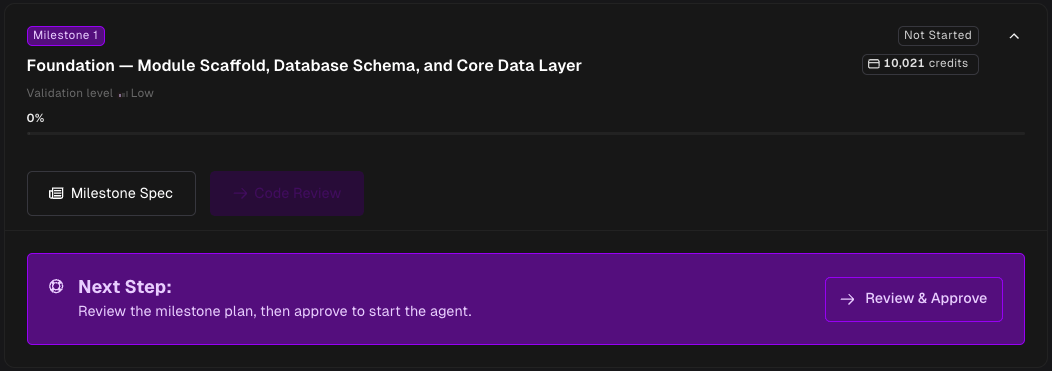
Credits are consumed when a milestone produces a pull request — not when it starts. If a milestone fails or you cancel it, the credits reserved for it are released back to you. Before each milestone runs, estimates its credit cost based on the scope of work involved. The actual cost depends on the complexity of the changes.Approving a Milestone’s Cost
Starting a milestone opens a Start this milestone? dialog showing what the run will cost, in both dollars and credits, before anything happens.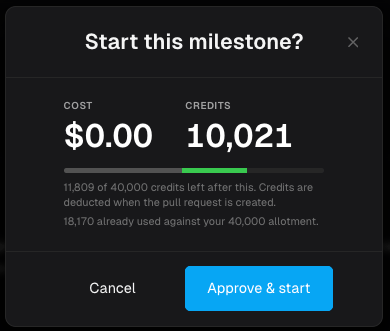
- Inside your included credits — the dialog tells you how many credits you will have left afterward, and the button reads Approve & start. Nothing is charged.
- Beyond your included credits — the dialog shows how many credits go past your allotment and at what rate, and the button reads Approve with the amount. You are billed when the pull request is created.
The dialog prices the run against credits you have already used and credits committed to milestones currently in flight. Approving two milestones back to back gives you an accurate figure for the second one, not a stale one.
Your Included Credits
Your plan includes 40,000 credits per month. This resets at the start of each billing cycle. Unused credits do not carry over. If your usage exceeds the included credits, additional credits are billed at $0.01 per credit. Approved overage is billed to your payment method on file when the milestone’s pull request is created.Promo Codes
If you have a promo code, enter it under Have a promo code? on the payment page and click Apply. Codes can add bonus credits to your monthly allotment, and may apply for a set number of months. Applied codes appear as a badge showing what they granted.Checking Your Balance
Your current credit usage is visible in the application dashboard. The credit gauge shows:- Available — credits you can still spend
- Used this period — credits already consumed
- In progress — credits committed to milestones currently running
- Included / month and Over allotment
- Your next billing cycle reset date
Seats
Your plan includes a set number of seats, shown on the Members screen as3 of 5 seats used.
When every seat is in use, the invite and create-user flows will not open until a seat is freed. On -hosted plans you can raise your seat count from the Billing page. On self-managed deployments, remove a member or revoke a pending invitation to free one up.