

When to Use an Adhoc Milestone
- Scope that deserves its own milestone. The work is more than a small fix — it needs planning, multiple tasks, or its own PR.
- Work discovered mid-migration. You spot a gap during PR review, testing, or demo prep that should ship before you move on.
- One-off requirements outside the original spec. You need something done now without re-running roadmap generation for the whole project.
- At the end of the project, when Final Code Delivery is ready. All standard milestones are merged and the final delivery PR is open — but you still need an ad hoc fix, refactor, or change before you ship. Create an adhoc milestone to handle that work through the normal milestone pipeline; Final Code Delivery waits until any open ad hoc / upstream milestone completes.
Creating an Adhoc Milestone
- Open the project Roadmap.
- In the sidebar, find the Ad Hoc Work section.
- Click Ad hoc Milestone.
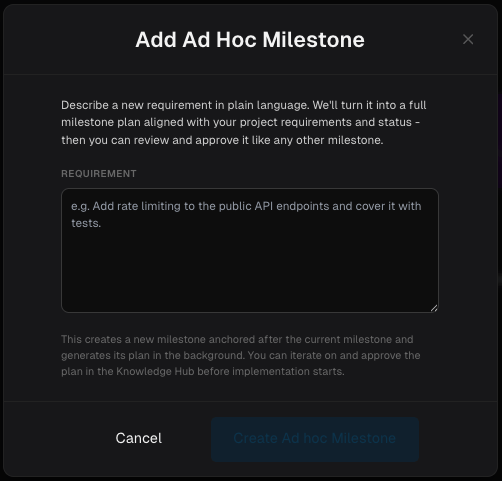
- In the drawer, describe your requirement in plain language — what you need, why, and any constraints that matter (files, APIs, test expectations, etc.).
Add rate limiting to the public API endpoints. Use a token-bucket per client IP, return HTTP 429 with a clear error body, and cover the happy path and limit-exceeded cases with tests.
- Click Create Ad hoc Milestone.
- Open the milestone on the Roadmap or in Project Knowledge.
- Review the generated milestone spec — title, description, deliverables, and task breakdown — the same way you would for a standard milestone.
- Edit the spec if needed, then approve it.
- Start implementation and follow the normal milestone lifecycle.
How Adhoc Milestones Behave
Once the plan is ready, an adhoc milestone behaves like any other milestone:
Adhoc milestones participate in the same dependency and sequencing rules as standard milestones. Other milestones that depend on this work stay blocked until the adhoc milestone is merged.
Planning in Parallel, Running One at a Time
Creating an adhoc milestone only plans it — nothing runs until you start it. So you can create as many as you like, whenever you like, including while another adhoc milestone is still open or while a standard milestone is in progress. Each new one lands on the Roadmap as the next sub-milestone (3.1, then 3.2, and so on) and waits for you. Execution is what is serialized. A queued milestone shows as Pending with no start action until every earlier off-sequence milestone at the same anchor has finished, and only one off-sequence milestone. You always start each one yourself; a queued milestone never begins on its own.Ad hoc Validation and Upstream Sync work differently: those two actions are disabled while other milestone is running or any off-sequence milestone is still open.
Adhoc milestones proposed in chat
Project Knowledge and Code Review Chat can also write an adhoc milestone plan for you when you ask for work that is too large for the conversation at hand. The agent writes the plan, and the milestone appears on the Roadmap when the turn ends — queued exactly like one you created from the sidebar.When You Can (and Cannot) Create One
You can create an adhoc milestone when
- The project has an active project spec (normal after onboarding).
- Your build environment is ready to accept work — on Modelcode Hosted this is automatic; on a Self-hosted Daemon, your project’s pool needs at least one machine online.
You cannot create one when
Tips for Effective Requirements
- Be specific. Name endpoints, files, libraries, or behaviors you care about. “Add rate limiting to
/api/v1/*” beats “improve the API.” - State what done looks like. Include test expectations, status codes, or acceptance criteria the agent should satisfy.
- Right-size the ask. One adhoc milestone should cover one coherent piece of work. If the requirement spans multiple unrelated features, split it into separate adhoc milestones or update the roadmap instead.
- Review the generated plan before approving. Planning aligns the work with your project spec and current migration state — treat the spec like any other milestone and edit it before you approve.
Related Docs
Milestones & Tasks
The full milestone lifecycle from approval through merge
Roadmap
How milestones are ordered and unlocked
Editing Milestones
Adjust a planned milestone before approving it
Code Review Chat
Resolve review issues on a milestone already in progress
Validation Level
Ad hoc Validation vs. adhoc milestones
Creating Rules
Encode recurring preferences across milestones