> ## Documentation Index
> Fetch the complete documentation index at: https://docs.modelcode.ai/llms.txt
> Use this file to discover all available pages before exploring further.
# Adhoc Tasks
> Add custom work to any milestone — fixes, missing utilities, or one-off adjustments
export const ProductName = "The Morph Platform";
export const productName = "the Morph Platform";
Sometimes you need the agent to do something that isn't part of the original plan. **Adhoc tasks** let you add custom work to any milestone — fixing something you spotted during PR review, adding a missing utility, or adjusting generated code without re-planning the whole milestone.
Adhoc tasks live on the milestone's **Tasks** tab. They run alongside the agent-planned tasks, are reviewed automatically for conflicts with the existing plan, and produce code changes that ship as part of the same milestone PR.
***
## When to Use Adhoc Tasks
* **During PR review.** You notice a missing edge case, an additional file that needs adjustment, or a regression introduced by the milestone.
* **After a milestone completes.** Something was missed that should be part of *this* milestone before you merge.
* **One-off fixes.** Small, targeted changes that don't warrant editing the milestone spec and re-running planning.
For larger changes — for example, scope that should affect future milestones too — edit the [Milestone Spec](/customization/editing-milestones) or add a [Rule](/customization/rules) instead.
You can't add adhoc tasks to a **Merged** milestone. Once the milestone PR is merged, the milestone is closed; create a new task in a later milestone or open a new milestone instead.
***
## Creating an Adhoc Task
1. Open the milestone on the Roadmap and switch to the **Tasks** tab.
2. Click **+ Add Task** in the top-right of the tab (visible once the milestone has tasks).
3. A drawer opens with two fields:
* **Title** — A short name for the task (required).
* **Description** — A markdown editor pre-populated with a template:
```
### Overview
### Deliverables
```
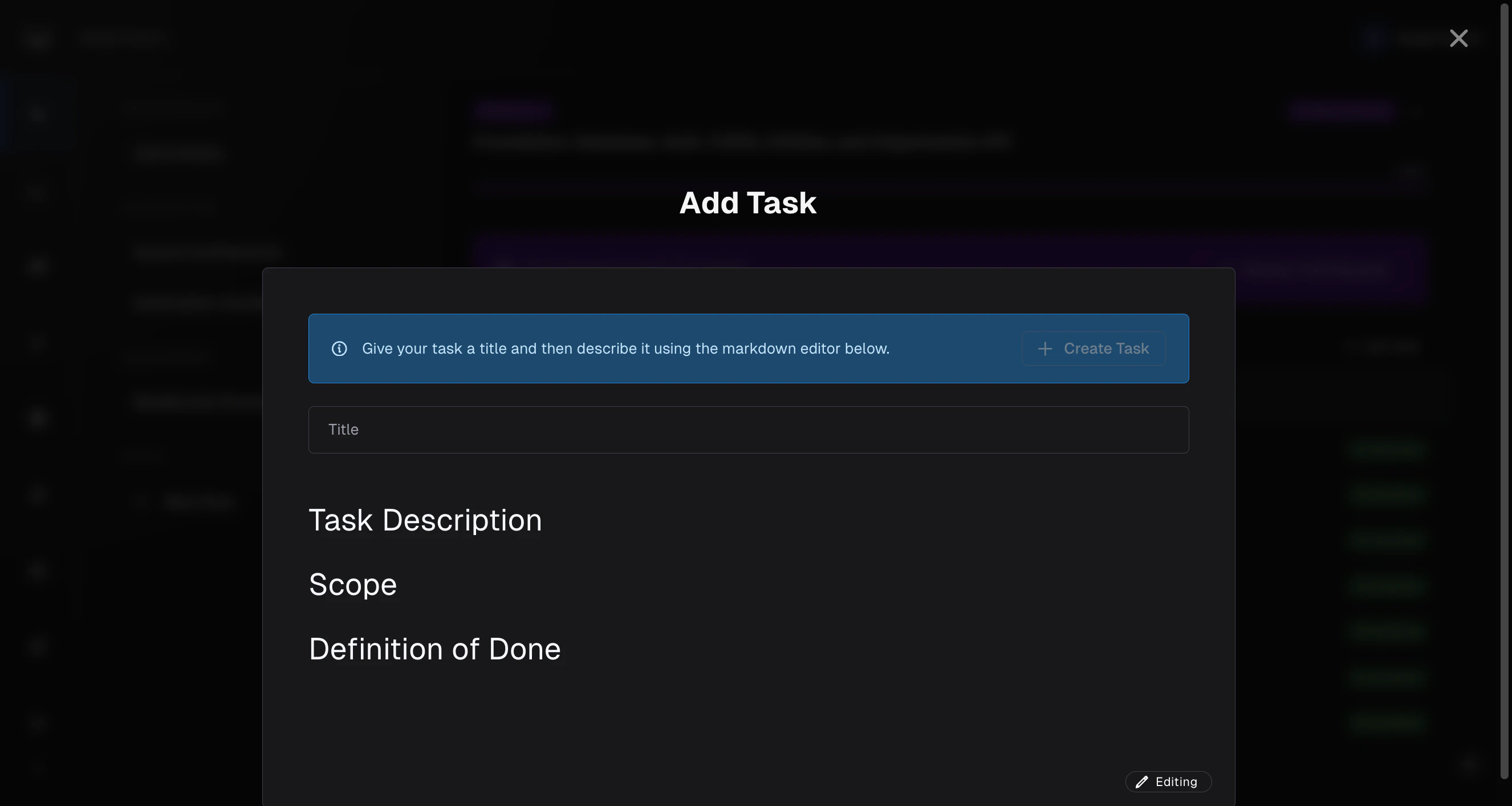 Fill in the description. **Be specific**: tell the agent exactly what to change, where, and what "done" looks like. Here's an example of a well-written adhoc task:
```markdown theme={null}
### Overview
The generated `auth.py` middleware is checking for the `Authorization` header
but not handling the case where the token is expired. Add token expiration
validation using the `jwt.decode()` expiry check, and return a 401 with
a clear error message when the token is expired.
### Deliverables
- `src/middleware/auth.py` — add expiration handling around `jwt.decode()`.
- `tests/test_auth.py` — add a test case for expired tokens.
- Expired tokens must return HTTP 401 with body `{"error": "Token expired"}`.
- All existing auth tests must continue to pass.
```
The more context you give (file paths, function names, expected behavior, definition of done), the better the result. Vague descriptions like *"fix the auth"* will produce vague results.
Click **Create Task** when you're ready.
***
## Reviewing Before Execution
After you create the task, {productName} runs a quick **review pass** to check it against the existing milestone plan, project spec, and any constraints already in play. This catches contradictions before the agent spends time on the wrong work.
1. Click **Review**. {ProductName} compares your task to the milestone context.
2. If there are **recommendations**, they appear inline in the editor as suggestions you can:
* **Accept** individually (or **Accept all**) — inserts the suggested text into the description.
* **Reject** individually (or **Reject all**) — leaves the description unchanged.
* Cancel out to address them one by one in the editor.
3. Use **Previous recommendation** / **Next recommendation** to walk through them.
4. After resolving recommendations (or if there are none), click **Execute Task**.
If you've edited the description after a review, the button switches to **Double check?** — click it to re-run the review against your latest edits before executing.
Recommendations are suggestions, not hard requirements. If a recommendation doesn't apply to your situation, reject it and proceed. The review is there to surface conflicts; you're still in control of the final task description.
***
## What Happens After Execute Task
Once you click **Execute Task**, the adhoc task is added to the milestone's task list and the agent picks it up like any other task — respecting dependencies, committing code when it finishes, and rolling its output into the milestone's pull request.
You can watch its status (Ready → In Progress → Completed / Failed) on the **Tasks** tab alongside the agent-planned tasks. If it fails, retry it the same way you'd retry any task — open the task drawer and click **Retry Execute**.
***
## Tips for Effective Adhoc Tasks
* **Give file paths, not vibes.** "Edit `src/users/service.ts` to add input validation on `createUser`" beats "fix the user service."
* **Define done.** State what success looks like: tests pass, endpoint returns the right status code, the screenshot matches.
* **Keep scope small.** One concern per adhoc task. If you're tempted to write a multi-page description, that's two or three adhoc tasks (or a milestone edit).
* **Let the review catch contradictions.** If your task contradicts the milestone spec, the review will flag it. You can then either adjust the task or update the milestone spec.
***
## Related Docs
The full milestone lifecycle and task dependencies
Triage milestone review issues with chat
When to edit the milestone spec instead of adding a task
Encode recurring preferences across milestones
Inspect adhoc-task output in the milestone PR
Fill in the description. **Be specific**: tell the agent exactly what to change, where, and what "done" looks like. Here's an example of a well-written adhoc task:
```markdown theme={null}
### Overview
The generated `auth.py` middleware is checking for the `Authorization` header
but not handling the case where the token is expired. Add token expiration
validation using the `jwt.decode()` expiry check, and return a 401 with
a clear error message when the token is expired.
### Deliverables
- `src/middleware/auth.py` — add expiration handling around `jwt.decode()`.
- `tests/test_auth.py` — add a test case for expired tokens.
- Expired tokens must return HTTP 401 with body `{"error": "Token expired"}`.
- All existing auth tests must continue to pass.
```
The more context you give (file paths, function names, expected behavior, definition of done), the better the result. Vague descriptions like *"fix the auth"* will produce vague results.
Click **Create Task** when you're ready.
***
## Reviewing Before Execution
After you create the task, {productName} runs a quick **review pass** to check it against the existing milestone plan, project spec, and any constraints already in play. This catches contradictions before the agent spends time on the wrong work.
1. Click **Review**. {ProductName} compares your task to the milestone context.
2. If there are **recommendations**, they appear inline in the editor as suggestions you can:
* **Accept** individually (or **Accept all**) — inserts the suggested text into the description.
* **Reject** individually (or **Reject all**) — leaves the description unchanged.
* Cancel out to address them one by one in the editor.
3. Use **Previous recommendation** / **Next recommendation** to walk through them.
4. After resolving recommendations (or if there are none), click **Execute Task**.
If you've edited the description after a review, the button switches to **Double check?** — click it to re-run the review against your latest edits before executing.
Recommendations are suggestions, not hard requirements. If a recommendation doesn't apply to your situation, reject it and proceed. The review is there to surface conflicts; you're still in control of the final task description.
***
## What Happens After Execute Task
Once you click **Execute Task**, the adhoc task is added to the milestone's task list and the agent picks it up like any other task — respecting dependencies, committing code when it finishes, and rolling its output into the milestone's pull request.
You can watch its status (Ready → In Progress → Completed / Failed) on the **Tasks** tab alongside the agent-planned tasks. If it fails, retry it the same way you'd retry any task — open the task drawer and click **Retry Execute**.
***
## Tips for Effective Adhoc Tasks
* **Give file paths, not vibes.** "Edit `src/users/service.ts` to add input validation on `createUser`" beats "fix the user service."
* **Define done.** State what success looks like: tests pass, endpoint returns the right status code, the screenshot matches.
* **Keep scope small.** One concern per adhoc task. If you're tempted to write a multi-page description, that's two or three adhoc tasks (or a milestone edit).
* **Let the review catch contradictions.** If your task contradicts the milestone spec, the review will flag it. You can then either adjust the task or update the milestone spec.
***
## Related Docs
The full milestone lifecycle and task dependencies
Triage milestone review issues with chat
When to edit the milestone spec instead of adding a task
Encode recurring preferences across milestones
Inspect adhoc-task output in the milestone PR