> ## Documentation Index
> Fetch the complete documentation index at: https://docs.modelcode.ai/llms.txt
> Use this file to discover all available pages before exploring further.

# Core Concepts

> Morph mental model and terminology

Morph structures the modernization process as a series of well-defined stages, guiding teams from initial project setup all the way to delivering production-ready pull requests. This page explains the key terms used throughout each phase of that journey.

## Table of Contents

* [tl;dr](#tldr)
* [Core Concepts](#core-concepts)
* [Project](#project)
* [Repositories and Roles](#repositories-and-roles)
* [Build Environment](#build-environment)
* [Project Spec](#project-spec)
* [Milestones](#milestones)
* [Tasks](#tasks)
* [Rules](#rules)
* [Functional Testing](#functional-testing)
* [Project Knowledge](#project-knowledge)
* [Wiki](#wiki)
* [Per-User Daemon](#per-user-daemon)
* [Collaboration](#collaboration)
* [Upstream Sync](#upstream-sync)
* [Visual Diagrams](#visual-diagrams)
* [Glossary](#glossary)

## tl;dr

Morph turns your migration into a step-by-step pipeline:

1. Create a [**Project**](#project) (pick your repo(s) and assign [roles](#repositories-and-roles))
2. Configure the [**Build Environment**](#build-environment) (lifecycle commands, env vars, validation)
3. Define your [**Project Spec**](#project-spec) (what should change & how)
4. Review and approve the [**Project Spec**](#project-spec)
5. Generate a **Roadmap** of [**Milestones**](#milestones)
6. Execute each [**Milestone**](#milestones). During execution, Morph dynamically generates [**Tasks**](#tasks) so progress is transparent and each deliverable is verifiable.
7. Once milestone tasks are completed and verified, Morph produces a production-ready PR for that milestone.

Each concept builds on the previous one, so decisions stay traceable from high-level goals down to individual code changes.

## Core Concepts

### Project

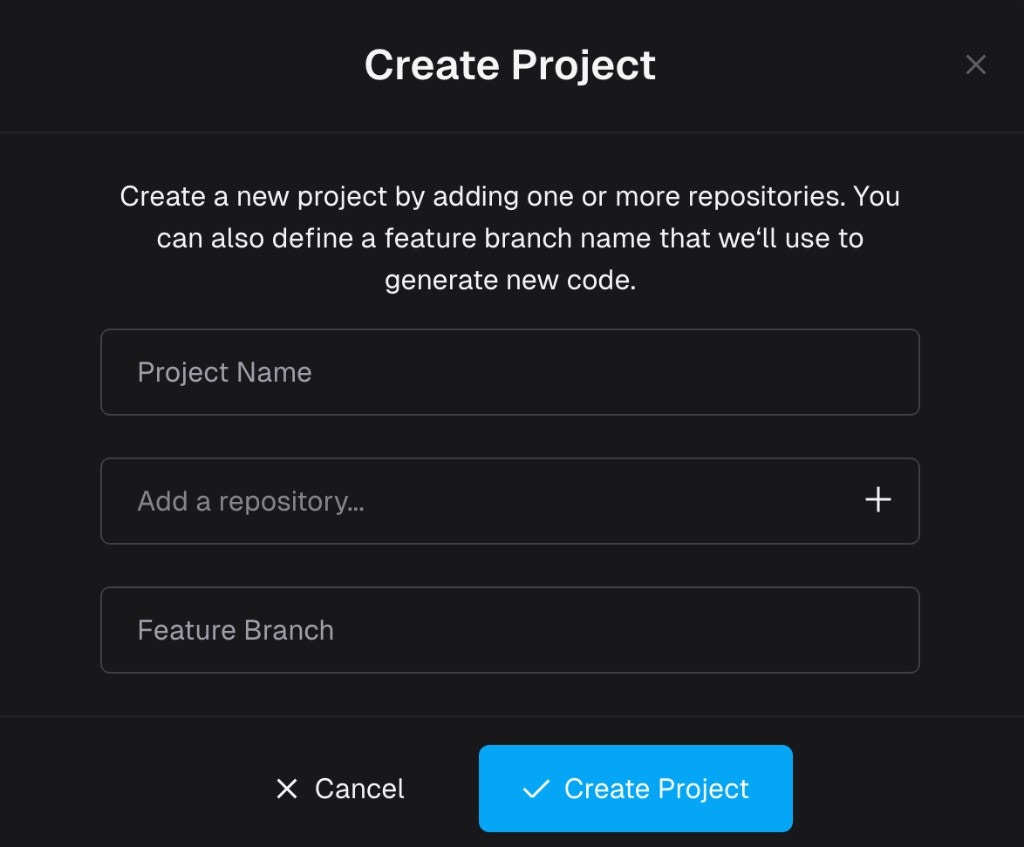
A **Project** is the top-level container for a modernization effort. It defines:

* Which repositories are in scope and their roles in the migration
* Which branch strategy to use for generated code (feature branch)
* The operational boundary for the [Project Spec](#project-spec), [milestones](#milestones), and [rules](#rules)

In practice, a project is where Morph keeps the full migration context from initial setup to final PR delivery.

<div align="center">
  <img src="https://mintcdn.com/modelcodeai/yGDXyn2bRkDDZxHT/images/core-concepts/create-project-modal.png?fit=max&auto=format&n=yGDXyn2bRkDDZxHT&q=85&s=333d22d89c2596686bb020d978cdf200" alt="Create Project modal" width="50%" data-path="images/core-concepts/create-project-modal.png" />

  <p>Morph Project creation</p>
</div>

Some common use cases:

* Modernizing a legacy Flask-based application to FastAPI
* Rewrite C++ CLI using Rust
* Java application version upgrade
* Migrating a backend and its shared library together

### Repositories and Roles

A project can contain **one or more repositories**. Each repository has a defined role in the migration:

| Role                     | Description                                                      |
| ------------------------ | ---------------------------------------------------------------- |
| **Modified**             | An existing repository that will be transformed during migration |
| **New**                  | A new repository created as part of the migration                |
| **Reference Only**       | A repository included for context but not modified               |
| **One-to-One Migration** | Direct migration from one repository to another                  |

When creating a project, you select repositories and set an **origin branch** for each. The project also has a shared **feature branch** (prefixed with `morph-`) where generated code is committed.

The **Project Overview** — part of the Project Spec flow — captures the full picture: which repos you start with, which repos you end with, and each repo's modernization role.

### Build Environment

The **Build Environment** defines how your project builds, runs, and tests. This is configured during onboarding and is required before Morph can validate and execute migrations.

There are two options:

* **Cloud** — Morph provides a cloud-based build environment for projects with publicly accessible dependencies. Lifecycle configuration is **auto-discovered**.
* **Self-hosted Daemon** — A lightweight binary you run on your own infrastructure, necessary when your project depends on private registries, internal APIs, or on-premise services

Each project has a **Lifecycle Setup** — a configuration containing:

* **Scripts** — Ordered shell scripts that install dependencies, build, run, health check, and test the application
* **Environment variables** — Variables your application needs at build or runtime, with optional encryption for secrets
* **Lifecycle document** — A markdown overview describing the application architecture and how scripts fit together
* **Validation** — An end-to-end run that executes each script in sequence to confirm everything works

For cloud projects, Morph maintains separate lifecycle configurations for the **origin** (source) and **target** (destination) sides of the migration. The origin is discovered during onboarding; the target is discovered automatically during the foundation milestone.

<Card title="Lifecycle Setup" icon="terminal" href="/setup/build-environment/lifecycle-setup">
  How lifecycle configurations are discovered, reviewed, and validated
</Card>

### Project Spec

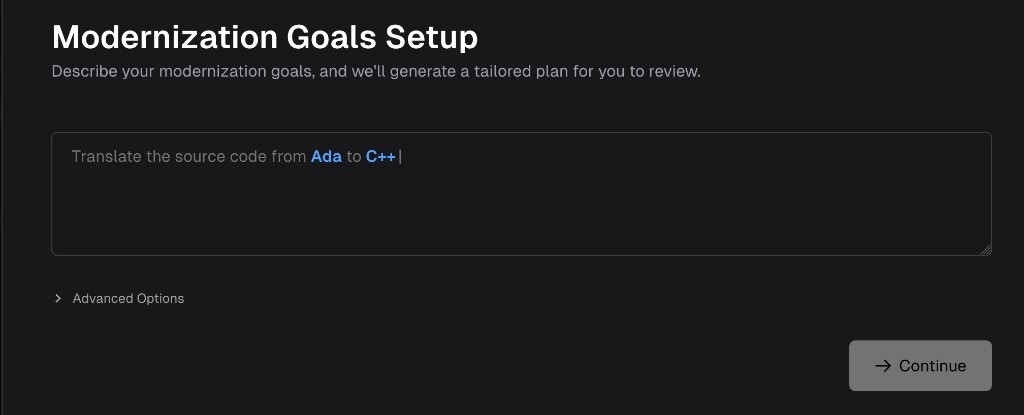
The **Project Spec** is the source-of-truth document for what "done" means. It captures migration requirements before implementation begins.

You review and approve it in the **Project Knowledge** drawer on the **Roadmap** (under **Modernization** → **Project Knowledge**): select **Project Spec** in the tree and use **Knowledge chat**. The drawer opens automatically the first time the spec is ready.

<Card title="Reviewing the Project Spec" icon="file-lines" href="/setup/reviewing-project-spec">
  Walkthrough: refine with chat, Auto-review, and approve
</Card>

Typical contents include:

* Target stack
* High-level migration plan
* Key design decisions
* Project overview (repos at start, repos at end, and their roles)
* Testing strategy

<div align="center">
  <img src="https://mintcdn.com/modelcodeai/yGDXyn2bRkDDZxHT/images/core-concepts/project-spec-modal.png?fit=max&auto=format&n=yGDXyn2bRkDDZxHT&q=85&s=4d90d7a3ce0ed2e20889710ec7b4ca40" alt="Project Spec in Project Knowledge" width="75%" data-path="images/core-concepts/project-spec-modal.png" />

  <p>Project Spec in Project Knowledge</p>
</div>

The Project Spec must be approved before Morph generates the roadmap. Once approved, it cannot be edited.

### Milestone

A **Milestone** is a coherent, reviewable chunk of migration work. Milestones are organized in a dependency graph — independent milestones can execute in parallel, while dependent milestones wait until their prerequisites are merged.

* Functionally meaningful (not arbitrary file splits)
* Small enough to review safely
* Dependency-aware: independent milestones run in parallel for faster delivery; dependent milestones stay locked until prerequisites merge

Each completed milestone produces a Pull Request for your review. When a milestone merges, sibling milestone branches that share dependencies may be flagged for an automatic **rebase** to stay current with the feature branch.
<Card title="Milestones & Tasks" icon="list-check" href="/migration/milestones-and-tasks">
  The milestone lifecycle, dependencies, parallel execution, and rebase
</Card>

### Task

A **Task** is the smallest executable unit inside a milestone. Tasks translate milestone intent into specific implementation actions.

Tasks usually map to one of:

* File/module creation or migration
* Endpoint or data-model implementation
* Test implementation
* Refactor/fix work

### Rules

**Rules** are custom instructions that apply across all milestones. They encode your team's coding standards, library preferences, and patterns so that Morph follows them consistently throughout the migration.

Rules can be added, edited, or removed at any point during the migration.

### Functional Testing

**Functional Testing** verifies that migrated code behaves identically to the original by comparing real outputs side by side. Morph automatically generates, runs, and validates these tests as part of the milestone lifecycle — no manual test authoring required.

Functional testing supports multi-repo projects and covers three types of applications:

* **API testing** — Compares HTTP responses (status codes, response bodies) between origin and target for each endpoint
* **CLI testing** — Compares exit codes and stdout/stderr output between origin and target for each command
* **UI testing** — Captures screenshots and video recordings of the target application's frontend, with optional side-by-side comparison against the origin

Results are surfaced per-milestone (as a test summary on each milestone card) and in a project-level **Validation Hub** with dedicated **API/CLI**, **UI Testing** (split into **Test** and **Comprehensive** sub-tabs), and **Lifecycle** tabs — the last of these reports install/build/run/test script results.

<Card title="Validation Hub" icon="vial" href="/migration/functional-testing">
  How functional tests are generated, verified, and reported
</Card>

### Project Knowledge

**Project Knowledge** is the in-app drawer on the **Roadmap** where structured context lives together: **Project Spec**, **milestones**, **wikis**, and **rules**, plus **Knowledge chat**. Agents read this context during work and write updates back (often as new or revised wiki pages). Approving the [Project Spec](#project-spec) is one important use of this drawer; everything else you can do there — imports, rules, diffs, milestone text — is covered in [Project Knowledge](/customization/project-knowledge).

Project Knowledge serves two purposes:

* **Agent-to-agent knowledge transfer** — When one agent discovers a pattern or makes an architectural decision, it writes that knowledge back. Later agents read it and stay consistent.
* **User-to-agent guidance** — You can add documentation, coding standards, or design decisions at any time. The content you provide is broken down into structured wiki pages and rules that agents can consume efficiently.

### Wiki

A **Wiki** page is a piece of project knowledge stored with your project (shown under **Wikis** in Project Knowledge). Wikis capture architecture decisions, design patterns, integration notes, and other context that agents reference during execution. Unlike rules, wikis are treated as informational context rather than hard requirements.

### Per-User Daemon

When using a [Self-hosted Daemon](/setup/build-environment/self-hosted-daemon), each team member has their own daemon instance. Your daemon handles your work exclusively and runs one job at a time. This means multiple team members can work on the same project simultaneously — each using their own daemon — without blocking each other.

The daemon reports its status in real time: **online** (ready), **busy** (running a job), or **offline** (disconnected). If your daemon is busy, new requests queue until the current job finishes.

### Collaboration

Multiple team members can review the same milestone at the same time. Each reviewer gets their own independent [review chat session](/migration/code-review-chat#collaboration), so conversations and issue triaging don't collide. When one reviewer resolves an issue or the agent applies a fix, the change is propagated to other active reviewers' workspaces.

### Upstream Sync

As your team continues pushing to the repository's mainline during the migration, {productName} can incorporate those changes through an **upstream sync**. This creates a sync milestone that integrates mainline changes into the feature branch and rebases affected milestone branches. See [Git Strategy — Upstream Sync](/setup/build-environment/git-strategy#upstream-sync) for details.

## Visual Diagrams

### Concept Relationship Diagram

```mermaid theme={null}
flowchart TD
    A[Project] --> B[Repositories & Roles]
    A --> C[Build Environment]
    C --> L[Lifecycle Discovery]
    L --> D[Project Spec]
    B --> D
    D --> E[Milestone Plan / Roadmap]
    E --> F[Tasks]
    E --> H[Functional Tests]
    F --> G[PR / Merge]
    H --> G
    I[Project Knowledge] --> E
    I --> F
    F -.->|writes back| I
    D --> I
```

## Glossary

| Term                                       | Definition                                                                                                                                                                        |
| ------------------------------------------ | --------------------------------------------------------------------------------------------------------------------------------------------------------------------------------- |
| [Project](#project)                        | Top-level modernization container for repos, branch strategy, and all migration artifacts.                                                                                        |
| [Repository Role](#repositories-and-roles) | The function a repository serves in the migration (Modified, New, Reference Only, One-to-One).                                                                                    |
| [Build Environment](#build-environment)    | Configuration for how the project builds, runs, and tests — cloud or self-hosted.                                                                                                 |
| Lifecycle Setup                            | Project-level configuration containing scripts, environment variables, and a lifecycle document. Maintained separately for origin and target. Auto-discovered for cloud projects. |
| Lifecycle Discovery                        | Automated process that analyzes a repository and discovers how to install, build, run, and test it.                                                                               |
| [Project Spec](#project-spec)              | Source-of-truth for what the migration must produce (also called Instructions). [Review and approve](/setup/reviewing-project-spec) in the Project Knowledge drawer using chat.   |
| [Milestone](#milestones)                   | Reviewable chunk of migration work with dependencies. Independent milestones run in parallel; dependent milestones wait.                                                          |
| [Task](#tasks)                             | Smallest actionable implementation unit within a milestone.                                                                                                                       |
| [Rules](#rules)                            | Custom instructions encoding team standards, applied across all milestones.                                                                                                       |
| [Functional Testing](#functional-testing)  | Auto-generated tests that compare origin and target behavior side by side. Covers API, CLI, and UI testing. Reported in the Validation Hub.                                       |
| Validation Hub                             | Project-level dashboard for functional test and lifecycle script results, with API/CLI, UI Testing, and Lifecycle tabs.                                                           |
| [Project Knowledge](#project-knowledge)    | Roadmap drawer listing Project Spec, milestones, wikis, and rules, with Knowledge chat — the UI for the structured context agents read from and write to.                         |
| [Wiki](#wiki)                              | Project knowledge page under Wikis in Project Knowledge — architecture decisions, patterns, and integration notes.                                                                |
| [Per-User Daemon](#per-user-daemon)        | Each team member's own ModelDaemon instance, handling that user's work independently.                                                                                             |
| [Collaboration](#collaboration)            | Per-user review chat sessions that allow multiple reviewers to work on the same milestone simultaneously.                                                                         |
| [Upstream Sync](#upstream-sync)            | Incorporating mainline changes into the migration feature branch and rebasing affected milestone branches.                                                                        |
| Rebase Required                            | A milestone state indicating its branch must incorporate newly merged sibling milestone code before it can be merged.                                                             |
| Roadmap                                    | The main screen in the Morph Platform listing the project's milestones, with other project entities available via sidebar.                                                        |
| Project Overview                           | Summary of repos at start and repos at end, including each repo's modernization role. Part of the Project Spec.                                                                   |
